User list#
A list of every account — site visitors as well as the people who work in the administration. It is one list; what someone may do is decided by their role, not by where they appear.
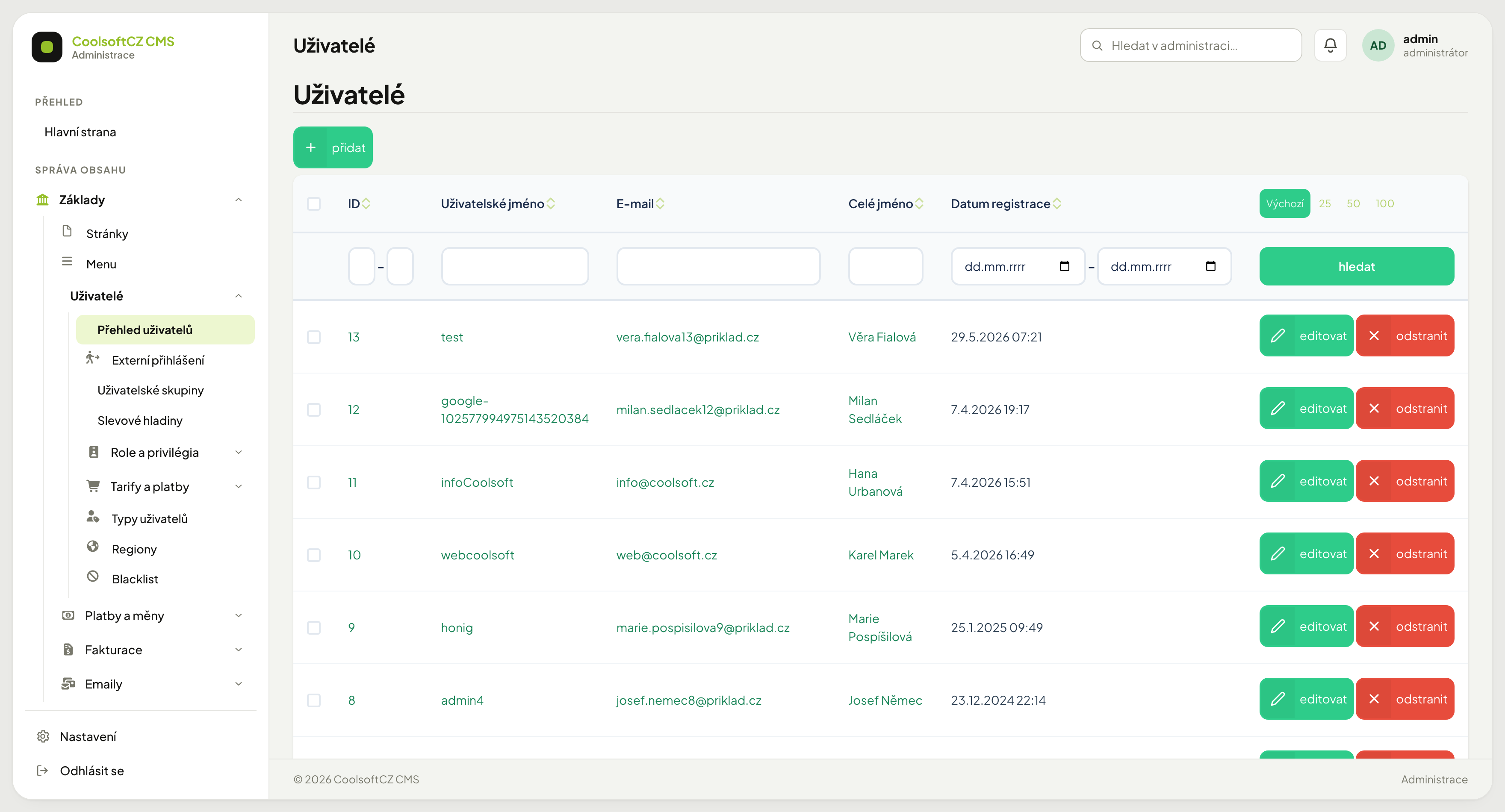
Find it under Základy → Uživatelé → Přehled uživatelů.
The list#
| Column | What it shows |
|---|---|
| ID | the account number |
| Uživatelské jméno | what the person signs in with |
| address for notifications and password recovery | |
| Celé jméno | first and last name |
| Datum registrace | when the account was created |
The username is not the email
They are two separate values and may differ — accounts created via Google or Facebook have a machine-generated username. Either of them can be used to sign in.
Creating an account#
- přidat above the list.
- Fill in the username, email and password (at least 10 characters).
- Add the first and last name.
- Assign a role — without one the person can sign in but sees nothing. Only someone with the permission to set roles can choose them (see Who may change roles).
- Save.
You usually do not create visitor accounts by hand — they come from registration on the site. Manual creation is for colleagues who need the administration.
Editing an account#
The form is split into sections: sign-in details, personal and address details, company details. See Working with forms.
A blank password field means “do not change the password”
The Heslo and Heslo znovu fields are always empty when opened. That does not mean no password is set — it simply is not displayed. Leave them blank and save and the existing password stays. It changes only when you type something into the fields.
A new password must have at least 10 characters
This applies when creating an account and when changing a password in the administration. Passwords that users set earlier or on the site (where 8 characters are enough) keep working.
The activation key is not in the form
The system stores the key from the activation email only in an unreadable form, so it can be neither displayed nor typed in by hand. Activate an account that never finished activation with the Aktivní toggle, or let the user request a new activation email with the button next to the site's sign-in form. The link in the activation email is valid for 72 hours.
When roles or groups cannot be saved
Roles and groups are saved together with the account. If they cannot be written, the save ends with a red message and the account is not changed — you are never left with an account that has different roles than the ones you chose. Open the form again and save once more; if the error persists, contact the system administrator.
Who may change roles#
Roles decide what a person may do in the system, so not everyone who may edit an account may change them. The Role field in the user form is available only with the permission Systém: Uživatelé — nastavení rolí (System: Users — set roles). By default only the Administrátor role has it.
Without this permission the roles field is greyed out, a note below it says Role může měnit jen uživatel s oprávněním „Nastavení rolí“ (správce). (Roles can only be changed by a user with the “Set roles” permission), and you save the other account details as usual — the roles stay as they were.
Should a role change get through without the permission, saving ends with the message Role uživatele nemůžete měnit — chybí vám oprávnění „Nastavení rolí“. and nothing is saved. The same applies to roles that are not Přiřaditelná (assignable, e.g. Vlastník): nobody can assign them.
To let another role change roles as well, give it this permission, see Roles and privileges.
Company details#
Ticking Firma enables company name, registration number and VAT ID.
Unticking Firma does not clear the existing details by itself
The fields just get hidden — whatever is still typed in them gets saved on submit. To actually clear a account's company details, delete their content by hand.
Resetting a colleague's password#
The administration has no public password recovery. When someone cannot get in:
- Find their account.
- editovat.
- Fill in both Heslo and Heslo znovu.
- Save, and pass the new password on by a route other than the email address they cannot reach.
Saving a new password signs the user out on every device and also invalidates any pending "forgotten password" link. If you change your own password, you are signed out too — sign in again with the new password.
Point site visitors to Forgotten password
A site user sets a new password themselves through a link sent to their email. That way the password never has to travel from you.
Blocking an account#
Access is controlled by two toggles at the top right of the form (the third, Affiliate zakázán, is described in Affiliate program):
| Toggle | Meaning |
|---|---|
| Aktivní | a disabled account cannot sign in |
| Zabanován | the account cannot sign in, its adverts and company profiles disappear from the website and its public profile shows a red "BANNED" badge |
Either one closes access — switch Aktivní off, or switch Zabanován on. This holds for both sign-in routes: by password and through a third-party account (Google, Facebook and the others under Login providers).
Which toggle when
Aktivní is an operational state — the account is awaiting email confirmation or someone parked it for a while. Zabanován is a penalty for behaviour, and others additionally see it as a badge on the public profile, and it hides the user's content (see below). For closing access the two are equivalent.
What happens to a banned user's content#
As soon as you save the account with Zabanován on, its adverts and company profiles disappear from the website at once — from listings, search, category counts and the sitemap for search engines, and they are left out of watchdog alerts. Anyone opening a direct link sees that the advert (profile) is not available.
Once you switch Zabanován off, the content comes back on its own; nothing else to set. Switching Aktivní off does not hide content — it only prevents sign-in.
Open sessions end at once
Saving revokes every signed-in session of that account on every device. Anyone with a window open at that moment is signed out on their next click and cannot sign back in.
The last active user with a protected role (Administrátor by default) cannot be deactivated, banned or have the account deleted — saving ends with the message Posledního aktivního uživatele s chráněnou rolí (např. správce) nelze deaktivovat, zabanovat ani zrušit. This way the system never ends up without an administrator. Give the role to another active account first. Which role is protected, see Roles and privileges.
Blocking beats deleting
Deleting an account cannot be undone and takes its links to orders, adverts and posts with it. When someone should merely lose access, switch Aktivní off or ban them.
Affiliate program#
When the affiliate program is on, every user has their own registration link. When editing an account you see their referral code, and in the Referred by field the account whose link the user registered through (with the code used at registration).
If you do not want to reward someone's referrals (for example because of abuse), turn on the Affiliate zakázán toggle at the top right of the form and save. From then on:
- the user does not see their link on the Můj účet page,
- registrations through their link are neither counted nor rewarded, even if someone comes through a link shared earlier.
Credits already received for referrals stay. You turn the toggle off just as easily and their referrals start counting again.
Account deletion#
A user can close their account on the site themselves (see Closing your account in the visitors' manual). The account is not closed at once: after the request a grace period runs, which you set in Nastavení → Nastavení webu → Registrace a soukromí → Lhůta před zrušením účtu (dny) (default 7 days). After it, a daily job anonymises the account.


In the user's edit form the state is shown in the Zrušení účtu (account deletion) section:
| State | What you see | What you can do |
|---|---|---|
| awaiting deletion | when the user asked and until when the account waits. They cannot sign in | Stornovat zrušení (cancel deletion) — the account returns to normal and the user can sign in again · Zrušit hned (delete now) — anonymises the account immediately, without waiting for the grace period |
| deleted and anonymised | when it happened | nothing — an anonymised account can no longer be edited |
What anonymisation does#
| Area | What is overwritten or deleted | What stays |
|---|---|---|
| Account | the email and username are replaced by placeholder text (a new registration can use them), the password stops working. The name, phone, address, company ID, VAT ID, company, website, "about me", IP address and profile photo are deleted | roles, credits, points, membership and the registration date |
| Signing in | the account is signed out on all devices; links to Google, Facebook and other services and any pending links (activation, password reset) are removed | — |
| Adverts | active ones are hidden from the site. On all of them (including ones hidden earlier) the contact email and the email, phone and street parameters are deleted. Saved search alerts and follows are cancelled | title, text, photos, price, town and the other parameters; you still see them in the administration |
| Company profiles | active ones are hidden from the site, saved search alerts are cancelled | everything else, including the company's contact details (email, phone, address, contact person) — they are the company's data, not the account's |
| Comments, reviews, discussion posts, discussion under blog articles | the author is shown as Smazaný uživatel (Deleted user), the author's email is deleted | the text, the rating (stars, pros and cons) |
| Newsletter | the address is removed from the subscription | — |
| Orders, complaints, documents and payments | nothing | everything — legal records |
| Replies to adverts, bookings, comments on jobs, guestbook, contact messages | nothing | everything — they belong to the other party, who needs them |
What counts as a contact in an advert
A parameter of type E-mail or Telefon, and parameters with the system key
email, phone or street. This applies to adverts only; company profiles keep their
contact details. If you change a parameter's key in the code list, it stops counting as a
contact.
Anonymisation and cancellation cannot overlap: once anonymisation of an account has started (after the grace period or through Zrušit hned), the system refuses the cancellation and changes nothing. Only a request that is not being processed yet can be cancelled.
Delete now cannot be undone
Personal data cannot be restored after anonymisation. The button is therefore protected by a confirmation. If the user only wants to stay away from the site for a while, switching Aktivní off is enough.
The state is visible only in the edit form
The user list cannot filter accounts awaiting deletion yet.
Searching#
You can filter by ID, username, email, full name and a registration date range. Filters add up — see Search and filters.
Deleting#
Delete an account with the bin icon in its row, several at once with the bulk action over the ticked rows. Two accounts cannot be deleted:
| Account | Message |
|---|---|
| your own | Vlastní účet nelze smazat. Nic se nesmazalo. (You cannot delete your own account.) |
| the last active holder of a protected role (e.g. the only administrator) | Nelze smazat posledního aktivního uživatele s chráněnou rolí (např. správce). Nic se nesmazalo. |
Likewise, a protected role cannot be removed from its last active holder in the form.
If a bulk action deletes only part of the selected accounts (someone else deleted the rest meanwhile), the message says how many: Smazáno uživatelů: 3 z 5; 2 se nenašlo…
Deletion is irreversible and has consequences
An account is tied to orders, invoices, adverts, comments and ratings. Deleting it breaks those ties. Before deleting, check that nothing is left behind — otherwise switch Aktivní off instead.