Reported posts#
Visitors can click Nahlásit (report) on a discussion post. Here you see all such reports and decide what to do with them.
Find them under Diskuze → Nahlášené příspěvky.
What it looks like#
The overview is a table, one row is one report.
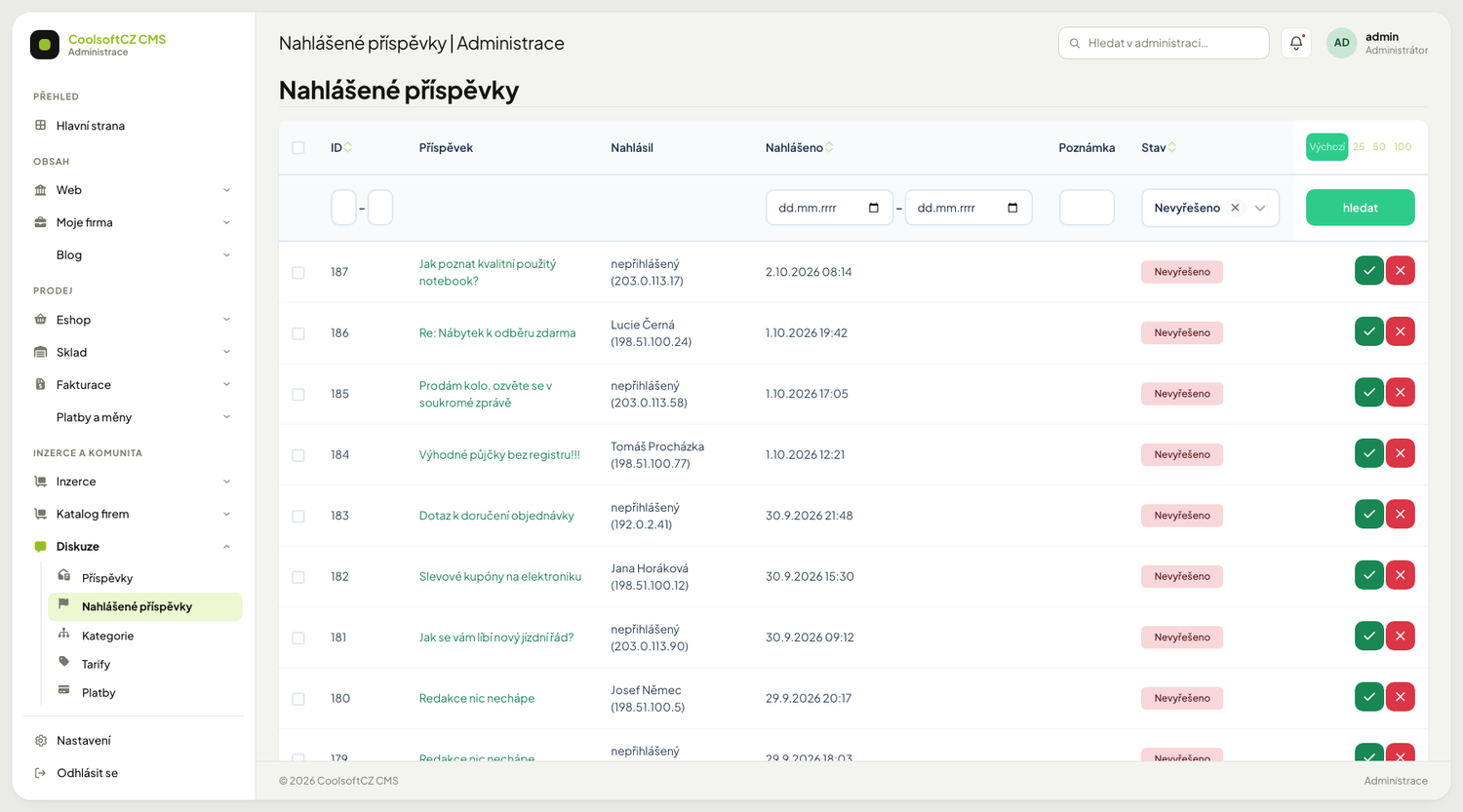
| Column | What is in it |
|---|---|
| Příspěvek (post) | the subject of the reported post (or the start of its text); clicking opens its edit page if you have the right to. If the post has been deleted meanwhile it says "(příspěvek byl smazán)" |
| Nahlásil (reported by) | the user's name and IP address; a signed-out visitor is shown as "nepřihlášený" with the IP address |
| Nahlášeno (reported at) | when |
| Poznámka (note) | text from the reporter — the site does not send one today, so it is usually empty |
| Stav (state) | Nevyřešeno (unresolved, red badge) or Vyřešeno (resolved, green) |
When opened you see only unresolved reports. The filter in the Stav column offers exactly three choices in this order: Vše (all), Nevyřešeno (unresolved, preselected) and Vyřešeno (resolved). There is no empty choice — it used to fall back to Nevyřešeno, so that choice appeared twice in the list.
Anyone can report, each once
One post can have several rows in the list from different people. From the same reporter (logged in by account, anonymous by IP address) there is always only one unresolved report — the system accepts another one only after you resolve the previous one.
Procedure: go through the reports#
- Open Diskuze → Nahlášené příspěvky. The state Nevyřešeno is selected.
- Click the post title in the Příspěvek column to open its edit page.
- Decide (see Moderation): keep the post, deactivate it, or delete it.
- Return to the report overview and click Vyřešit (resolve) on the row. The row disappears from the unresolved ones.
A report deleted in the meantime
If another moderator has deleted the report in the meantime, neither Vyřešit nor Znovu otevřít changes anything; you get the message "Nahlášení neexistuje (mohlo být mezitím smazáno). Nic se nezměnilo." (the report does not exist, it may have been deleted in the meantime; nothing was changed). Refresh the overview and carry on with the next row.
Procedure: reopen a report#
- In the overview change the Stav filter to Vyřešeno (or Vše).
- Click Znovu otevřít (reopen) on the row. The report goes back among the unresolved.
Procedure: delete a report#
- Choose Smazat on the row, or tick several rows and use the bulk Smazat označené.
- Confirm the question.
Deleting a report is not deleting the post
Only the record of the report is removed. The post stays published. A pointless report (from a robot, say) thus disappears and the post leaves the queue too.
The "Nahlášeno" flag on a post manages itself#
The Nahlášeno column on a post under Diskuze → Příspěvky: a post is marked as long as it has at least one unresolved report. The system recalculates it after every change:
| What you do | What happens to the flag on the post |
|---|---|
| someone reports the post anew | it turns on |
| you resolve the last unresolved report | it turns off |
| you reopen a report | it turns on |
| you delete the last unresolved report | it turns off |
That is why the flag cannot be switched by hand. In the post list the Nahlášeno column is read-only, and in the post form the Nahlášeno checkbox is greyed out with the explanation "Odvozeno z nahlášení: zaškrtnuté, dokud má příspěvek nevyřešené nahlášení. Mění se vyřešením nebo smazáním nahlášení v sekci Nahlášené příspěvky." (derived from reports: checked while the post has an unresolved report). Saving the post does not change the flag.
Want the flag off? Resolve the reports
The flag disappears as soon as the post has no unresolved report left — resolve them, or delete the pointless ones.
Permissions#
Only someone with the permission to edit reports can resolve and reopen, and only someone with the permission to delete can delete. Without the permission the buttons on the row are not offered at all.
Where to go#
| I want | Where |
|---|---|
| remove or hide a reported post | Posts |
| forbid posting for signed-out visitors | Diskuze → Nastavení, see Overview |
| give a moderator the permission | Roles and privileges |