PDF layouts#
How a document looks when printed. Find them on the invoice type and under Systém → PDF šablony.
The layout is chosen along four things#
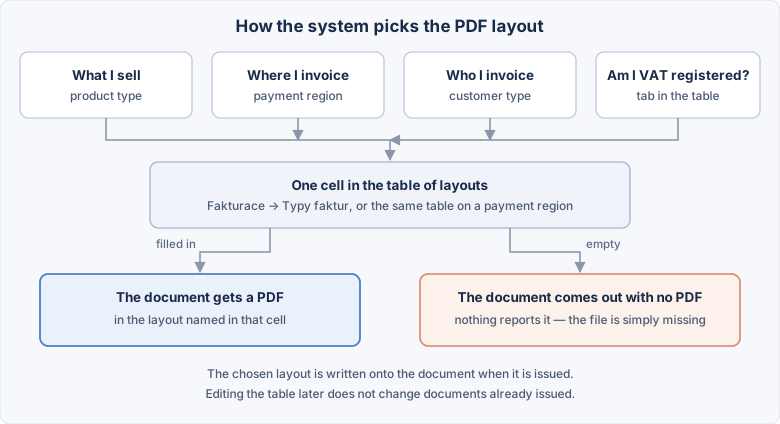
Every invoice type has a table — the administration calls it the Matice PDF variant (PDF variant matrix) — crossing:
| Axis | Example |
|---|---|
| Product type | goods, services, subscription |
| Payment region | Czechia, Slovakia, EU |
| User type (buyer) | VAT registered, not registered, company, individual |
| Are you VAT registered? | two tabs above the table |
The cell holds the PDF template variant to be used. A cell with no choice shows a
dash —.
Why so many combinations
An invoice for a Slovak VAT payer looks different from one for a Czech individual — different texts, a different VAT breakdown. Without the matrix it would mean picking by hand on every document.
The two tabs: seller registered and not registered#
There are two tabs above the table:
| Tab | Which documents it covers |
|---|---|
| Prodejce plátce DPH (seller is VAT registered) | issued by a company that is registered in that payment region |
| Prodejce neplátce DPH (seller is not registered) | issued by a company that is not registered in that payment region |
Each tab has its own set of cells. Filling one does not carry over to the other.
Fill in both, even if today you invoice in one mode only
It only takes the company ceasing to be registered, or a second company being added, for documents to start landing in the other tab. An empty tab means documents with no PDF.
Registration can differ by region for the same company
A company is not necessarily registered "everywhere or nowhere". Which tab a particular document uses is described in My companies.
How a layout is found#
- If the document has a layout written on itself, that one is used. (It gets written there on issue — see below.)
- Otherwise a cell in the matrix is picked by product type, region, buyer type and by whether the seller is VAT registered.
- If the cell is empty, no PDF is produced.
The layout is fixed onto the document#
On issue the document copies the chosen layout into itself — just like the addresses, see the module overview.
Editing the matrix later does not redraw documents already issued
That is deliberate. If the layout were looked up again on every correction, an invoice could come out a year later looking different from the day it was issued. To genuinely redraw an old document, switch its layout by hand on the invoice.
The invoice has a PDF šablona / varianta (PDF template / variant) field. Left at — vyberte variantu —, the system picks the layout itself from the matrix. Choose something specific and your choice wins.
A missing combination is not reported
The invoice saves, it just stays without a file. No message appears anywhere. You notice because there is no PDF to download — and the cause is usually an empty cell in the matrix.
Fill in at least the most common combination straight away
Before working through variants for every region, have the row that covers an ordinary invoice filled in. Add the rest as needed.
The matrix is edited from two places#
The same table is reachable from the invoice type and from the payment region — just rotated:
| Where you open it | What is fixed | What is in the columns |
|---|---|---|
| On the invoice type | the invoice type | payment regions |
| On the payment region | the payment region | invoice types |
In both cases the rows are buyer types, and both screens carry the registered/not-registered tabs.
A change in one place shows in the other
It is not a copy, it is one and the same data. Fill in a cell on the invoice type and you will see it on the region too.
The filename#
It is composed of the prefix from the invoice type and the document identification. The prefix is entered per language.
Keep the prefix short and without accents
faktura_ or invoice_. The file travels by email and into accounting; accents
and spaces in the name help nobody there.
The page layout#
Which page layout is used is in the module settings.
When a layout changes#
Old invoices do not regenerate themselves
A changed template applies to newly created PDFs. To carry it into an old document, regenerate its PDF — which overwrites it.
Regenerating empties the document folder
It is cleared first, and only then is the new PDF stored. Anything you added there by hand disappears.
A variant deleted from the system#
The matrix may keep a reference to a variant that no longer exists
A cell does not empty itself when a variant is deleted. Outwardly it shows as a document without a PDF. After deleting a variant, go through the matrices where it was used.