Discount levels#
A schedule of discount bands by points — how many points, how many percent off.
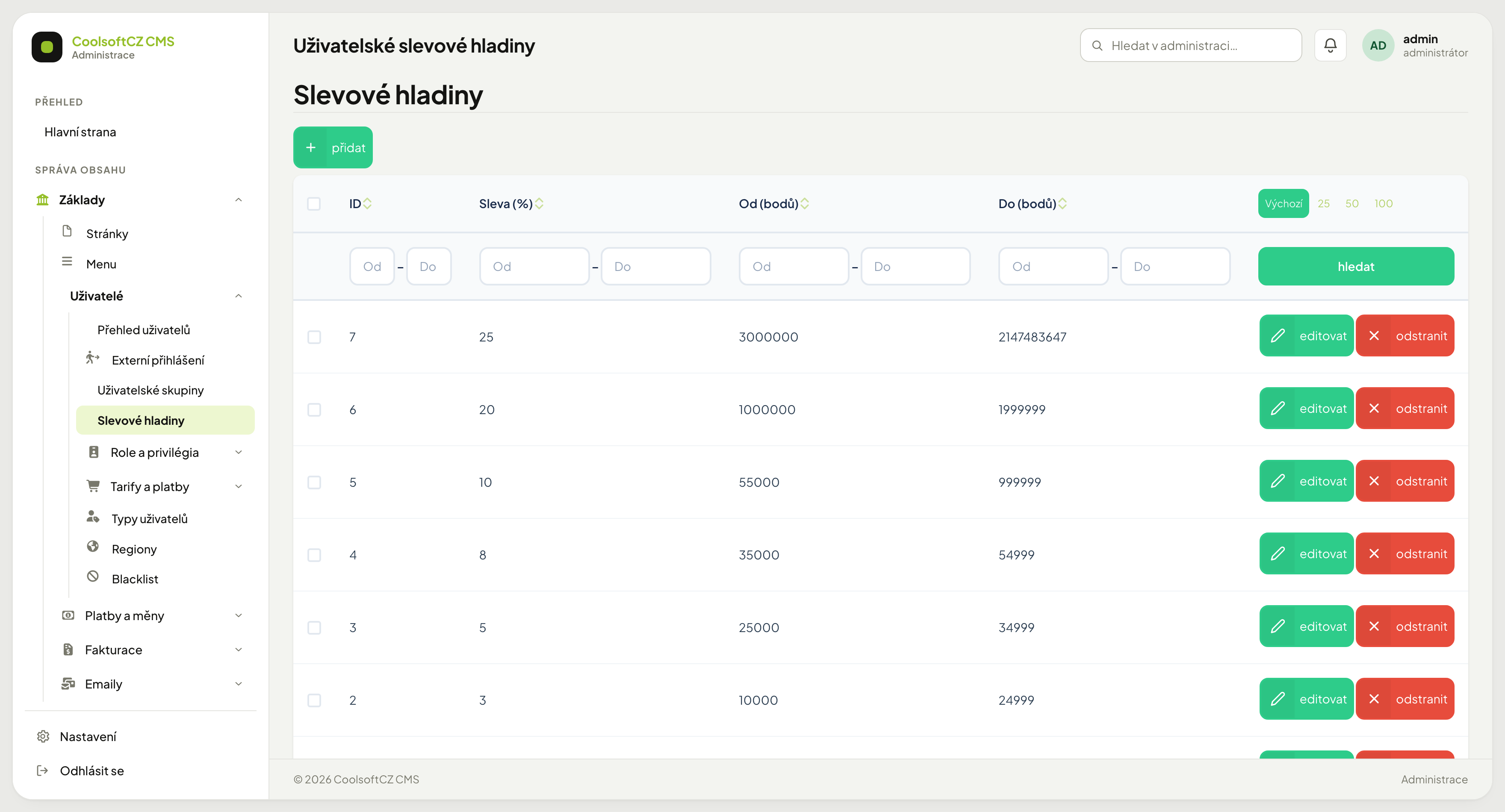
Find them under Základy → Uživatelé → Slevové hladiny.
A level is not assigned automatically, and has no effect on e-shop prices yet
Both the level and the point total are plain fields on every user's own form (Základy → Uživatelé → edit) — you set them by hand, the system does not compute them from anything. A new user gets the lowest level and zero points automatically at registration, and that is where it stops: no price calculation in the e-shop uses the level or the point total yet. The schedule is, for now, just a record, not a working discount mechanism.
How it works#
Each level is a range of points and a discount in percent — a schedule you define yourself. Which level a user is on, however, is not picked by the system from the range; the level is a manual choice on the user's own form (see above).
| Column | Meaning |
|---|---|
| Sleva (%) | the percentage the level stands for |
| Od (bodů) | lower bound, inclusive |
| Do (bodů) | upper bound, inclusive |
An example of the tiering:
| From | To | Discount |
|---|---|---|
| 10,000 | 24,999 | 3 % |
| 25,000 | 34,999 | 5 % |
| 35,000 | 54,999 | 8 % |
| 55,000 | 999,999 | 10 % |
Creating a level#
- přidat above the list.
- Fill in the discount in percent.
- Enter the point range, from and to.
- Save.
A gap between levels#
Even without automatic assignment, it is worth keeping levels free of gaps and
overlaps — once assignment (or some other feature that reads the schedule) is added,
inconsistent ranges will be harder to track down. When one level ends at 1,999,999
and the next starts at 3,000,000, it is unclear where a point total in the gap
belongs.
The top level#
The highest level needs an upper bound that cannot realistically be exceeded. A
large number is used for that (for example 2,147,483,647). It is neither a bug nor
a typo — it is how "and above" is written.
The user group discount#
A user group also carries its own discount percentage as a field on its form. Same as the level: no price calculation in the e-shop uses it either — it is a second, equally unused number for now.
Points#
The point total is a field on the user's card, set by hand. A new user starts at zero; the system does not award points automatically yet, for example for a purchase.