Address book#
Who you invoice. Find it under Fakturace → Adresář.
Card and contacts#
As with companies: the card holds the name and the link to a user, the invoicing details themselves sit in contacts. One customer may have several — registered office, branch, another country.
Contact fields#
| Field | Note |
|---|---|
| Name, second name line | two lines of the trading name |
| Company / first name / surname | the structured form, see below |
| Company number, VAT number | |
| Street, city, postcode, country | |
| E-mail, phone | |
| User type | VAT registered or not, company or individual |
| Information, VAT information | extra lines on the document |
| Delivery address | switched on with a toggle |
The billing profile#
The Fakturační profil (billing profile) section on the customer card. Five optional fields that override, for this one customer, what would otherwise be taken from your company or from the module settings.
| Field | Purpose | If left empty |
|---|---|---|
| Typ dokladu (document type) | a different number series and a different look | — dle nastavení firmy — (from company settings) |
| Měna (currency) | euros for Slovak clients, say | — dle nastavení firmy — |
| Platební region (payment region) | where you invoice to; picks the PDF layout and the default language | — výchozí region systému — (default system region) |
| Výchozí DPH (%) (default VAT) | the rate pre-filled on items; may be decimal (5,5), 0 to 100 |
taken from the company or the settings |
| Jazyk dokladů (document language) | which language the document comes out in | — dle platebního regionu — (by payment region) |
The typical case: two Slovak clients, two different invoices
One is VAT registered and is invoiced without VAT, the other is not and pays Czech VAT. Both are from the same country and still need a different document. This is where you settle the difference — by filling each profile differently.
Zero VAT is not the same as an empty field
0 means "genuinely a zero rate". An empty field means "take the default from somewhere else". If you want a zero rate, you must type the zero.
The document language#
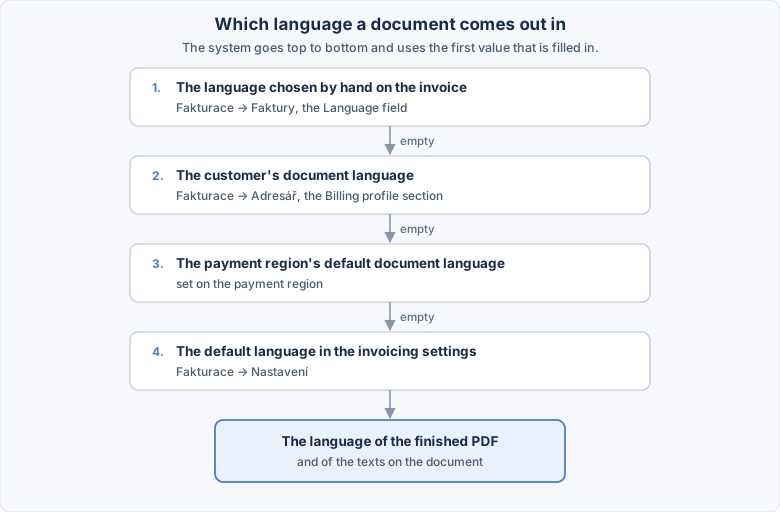
The system works top to bottom and uses the first value that is filled in. A language on the customer therefore beats the region's default, and a manual choice on the invoice beats both.
The language can be changed afterwards too
The invoice has a Jazyk (language) field. Switch it, save the document, and the PDF is produced again in the new language.
A name can be entered two ways#
Either as free text in the name, or broken out into the company / first name / surname fields. Fill in the breakdown and the system composes the name itself.
It does not work backwards
A single-line name cannot be split into a company and a person — the system would have to guess. If you want names broken out, enter them that way from the start.
The breakdown is what lets emails address people by name
Without it there is no way to tell which part of "Novák Jan Ltd" is what.
The link to a system user#
A customer card can be linked to a user account, chosen with a picker.
Without the link the customer does not see their invoices in their account
Documents appear in a profile precisely by this link. Do not skip it for e-shop customers.
The same link decides which jobs a client sees
If you use jobs, this link also decides what the client sees among their jobs on the site. It is entered here only — the job itself no longer has an account field.
If the user is deleted, the address book card stays — it simply loses the link. Document history is not deleted.
Delivery address#
With the Use delivery address toggle. It is then pre-filled onto the invoice.
The details on an invoice are an imprint#
Fixing the address book does not fix an issued invoice
The document has the address copied. When a customer reports a wrong company number after issue, correct both records — the card and the document. Fixing only one is the most common mistake in this module.