E-mail and SMTP#
Templates for the messages sent out, and the outgoing mail configuration.
E-mail templates#
Find them under Systém → E-maily.
Every message the system sends has a template — registration, password reset, order confirmation, saved search alert.
| Field | Note |
|---|---|
| Key | the designation the system finds the template by |
| Subject and text | per language |
| Attachments | files to be attached |
| Preferred | per the email queue settings, can skip the queue and go out at once |
| Odeslat hned (mimo frontu) (send immediately) | the email always goes straight to the recipient, bypassing the queue regardless of the Sending method setting. The Faktura z administrace (invoice from administration) template has it on, for example |
| Active | a disabled template is not sent, see Disabling a template |
Do not rename the key
The system looks the template up by exactly that. After a rename the message stops going out and nothing reports it — you find out when a customer complains.
An invoice from the administration has its own template
An invoice you send from the administration (with the Odeslat e-mailem action or by saving the invoice with sending ticked) uses the Faktura z administrace template with its own subject and body and goes out immediately. Invoices sent automatically (by the scheduler or after payment) keep using the original invoice template and follow the configured sending method. See Invoices.
Placeholders#
A template uses placeholders that are replaced on sending — the customer's name, the order number, the confirmation link.
A typo in a placeholder leaves it in the email as it stands
The customer then gets a message with a stray token mid-sentence. Send yourself the template after every edit.
The activation link is easy to delete without noticing
A registration or order confirmation template contains a link without which the customer cannot finish what they started. Leave it alone when editing the text.
The mark-as-read button in the response email#
Emails about responses to adverts carry a Označit jako přečtené (mark as read) button under the message text. The advert's owner uses it to mark the response without signing in, see Replies and saved searches.
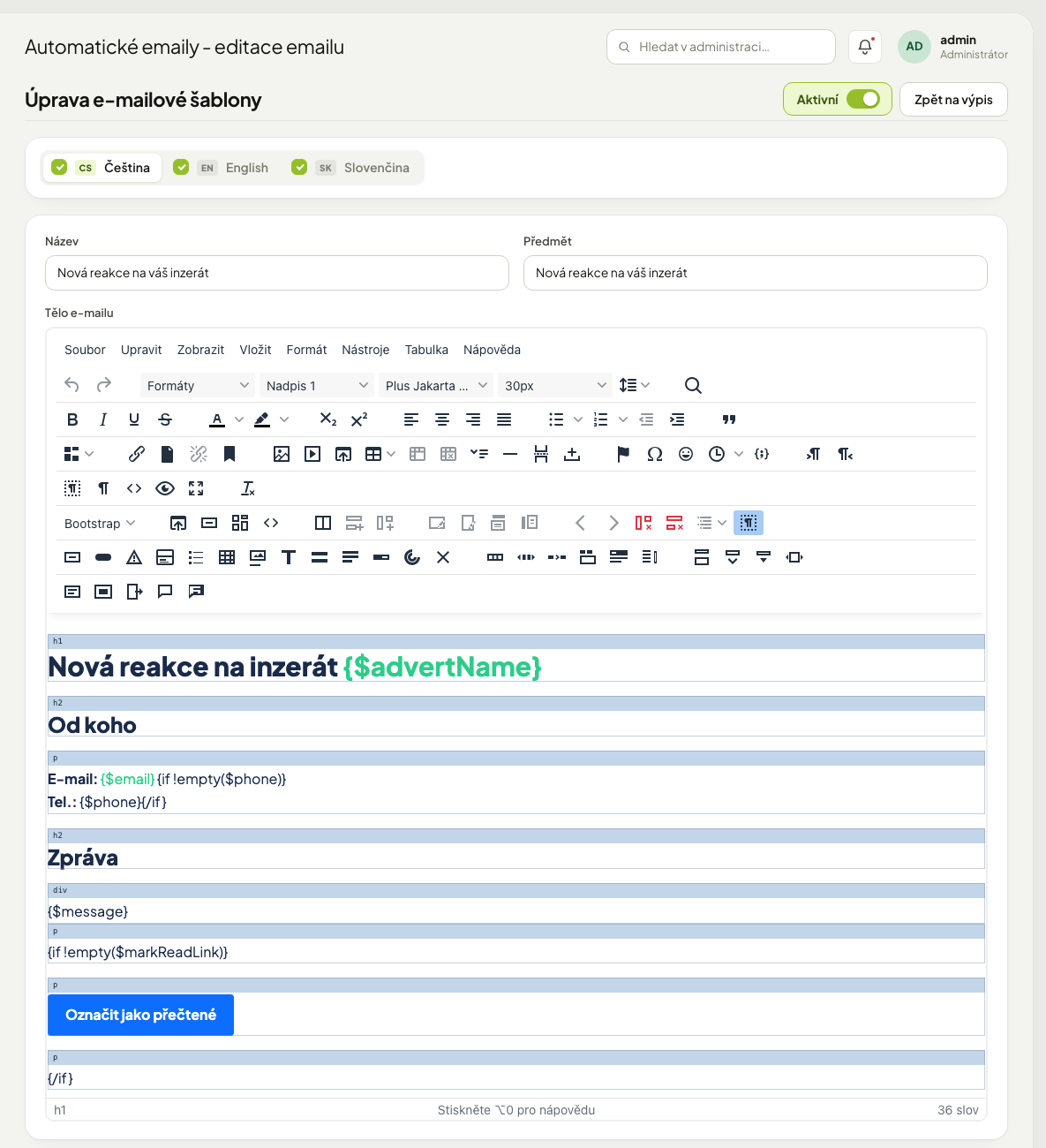
The button is part of the template — of three, by key:
| Template key | When it is sent |
|---|---|
BZ_ADVERT_RESPONSE |
a new response to a classifieds advert |
BZ_ADVERT_SUGGEST_PRICE |
a response with an offer of a different price |
CC_ADVERT_RESPONSE |
a new response to a company profile in the directory |
The link is put into the template with the placeholder {$markReadLink} (it is the whole
address) and the entire block sits inside a condition so the template also works where
there is no link:
Operators edit their templates, so when the button was introduced the text was not overwritten: the block was inserted after the message, and a template that already contained it was left as it was.
Procedure: put the button back into a template#
- Open Systém → E-maily and the template with the key from the table.
- For each language find the place after the message text (the placeholder
{$message}). - Insert the block from the example above. Translate the button text into the language of that version.
- Save and send yourself a test response to your own advert. The button must open the link and report "Reakce byla označena za přečtenou" (the response was marked as read).
If you rewrite the whole template body, the button disappears
Nothing reports it. Owners then mark responses only on the site. After a larger edit
of a template always check that the block with {$markReadLink} is still in the text —
in every language.
The link in the email is secret
Whoever has it can mark that one response as read. It allows no other action. Still, do not put it in public places (a newsletter, the site) and count on it when the email is forwarded.
Disabling a template#
Switch off a message you do not want to send with the Active toggle — in the template form, or directly in the Active column of the Systém → E-maily overview. The system does not send a disabled template and reports nothing (it is not an error). The same holds for a disabled language of the template: the customer does not get the message in that language.
Some messages are off after installation because not every operator wants them — for example the email to an advertiser about an edited advert, or the email to the administrator about a new order.
Disabling the order status change email
If you disable the ES_ORDER_CHANGED template, customers also stop getting the default
order status change email (for statuses without their own text).
Outgoing mail configuration#
Outgoing mail is configured in two places that complement each other.
Fallback SMTP and the sender address#
Find them under Nastavení → Nastavení webu (website settings), sections Odesílání e-mailů (sending email) and SMTP server.
| Field | Note |
|---|---|
| E-mail odesílatele (sender email) | the system address the site sends messages from |
| Jméno odesílatele (sender name) | optional, see below |
| Odesílat přes SMTP server (send through an SMTP server) | off = the server sends by itself |
| Server and port | |
| User and password | |
| Encryption | none, TLS, SSL |
This SMTP is the fallback: it is used when no account of its own is set for the sender address. The SMTP server section says so itself and links to the other screen.
Several SMTP accounts by sender address#
Find them under Nastavení → Nastavení e-mailových adres (email address settings; a tab in the Systém group, visible only with the permission). A list of rows, each valid for messages sent from one address.
| Field | Note |
|---|---|
| E-mailová adresa (email address) | the sender address the row applies to |
| Použít SMTP (use SMTP) | off = messages from this address are sent by the server itself |
| Server (host), Port | |
| Uživatelské jméno (username), Heslo (password) | |
| Zabezpečení (ssl/tls) (encryption) | |
| Timeout (ms), Perzistentní spojení (persistent connection) | advanced connection options |
The row matching the site sender address is marked with the Odesílatel webu (site sender) badge.
Procedure: send from another address through its own mailbox#
- Open Nastavení → Nastavení e-mailových adres and create a new row.
- Fill in the E-mailová adresa and the details of the mail server that serves it.
- Save.
- Trigger a message sent from this address and check in the received mail headers that it came from the right address and did not land in spam.
Messages from an address without its own row go out through the fallback SMTP from the website settings.
The mailbox password is not displayed in the administration
An empty field on save means "keep the current one". Do not email it or copy it anywhere.
Sender name#
The Jméno odesílatele field under Nastavení → Nastavení webu, section Odesílání
e-mailů, sets how the sender appears in the mail in front of the address, for example
My Company <info@company.com>. An empty field means only the address is shown.
The name may have at most 100 characters and must not contain <, > or quotation marks;
otherwise the form is not saved and the field shows an error.
The name is added only to messages from the system address
It applies to messages sent from the address in the E-mail odesílatele field. Messages from other addresses (for example from rows in Nastavení e-mailových adres) go out with the address only, without a name. If you expect the name there too, you will not get it.
Send from your own domain#
Mail sent on behalf of somebody else's address ends up in spam
Set a free-service address as the sender and the recipient's provider rejects or flags the message. Use an address in your own domain and have your administrator set up sender verification.
When emails do not arrive#
- Is SMTP configured correctly (the fallback in Nastavení webu, or the row for the sender address in Nastavení e-mailových adres), password included?
- What is in the email queue? The error on the message says why.
- Is the recipient's mailbox full, or does it not exist?
- Did it land in spam? Try a recipient on another domain.
- Is the template — and its language — active? A disabled one is not sent and does not even enter the queue.