Replies and saved searches#
Two routes by which emails leave the classifieds module.
Replies to an advert#
An interested party fills in the form on the advert. The message goes by email to the advert's owner; replying to it writes straight back to the enquirer.
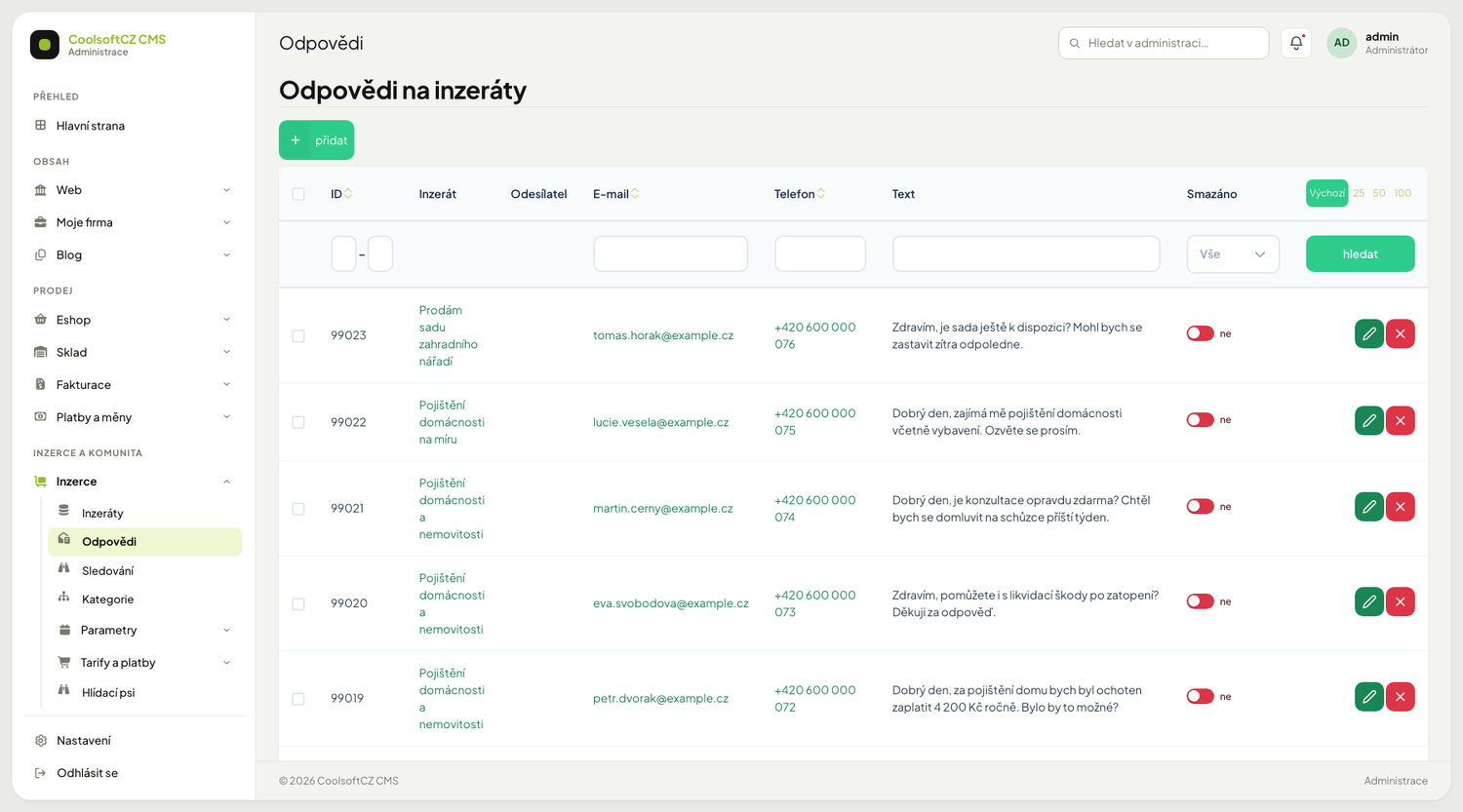
| Field | Note |
|---|---|
| E-mail and phone | of the enquirer |
| Subject and text | |
| Offered price | the enquirer may propose a different one |
| Read | |
| Deleted | soft, can be undone |
An offered price sends a different email
If the enquirer enters a price, a price-offer message goes out instead of an ordinary reply.
Replies are not approved
They go out at once. You see them in the administration only after they have been delivered — moderation is possible only after the fact.
Find them under Inzerce → Odpovědi and also on the advert itself.
When a reply is not possible
An advert marked Sold can no longer be replied to — the Reply to ad button does not appear on it. A reply from an e-mail, phone or IP address on the blacklist is not sent; the visitor sees a message that it is blocked. The same applies to enquiries to companies in the directory.
Who sees a reply#
A reply is meant for the advert's owner. The reply detail may be opened by:
| Who | How |
|---|---|
| the advert's owner (signed in) | in the Reakce na mé inzeráty overview on the site, or on the advert |
| the holder of the advert password | in the replies window when editing the advert — an advert posted without an account |
| an administrator | in the administration |
| anyone with the link from the email | only to mark the reply as read, nothing more, see below |
The sender of the reply and other users cannot open the detail.
The "Mark as read" button in the email#
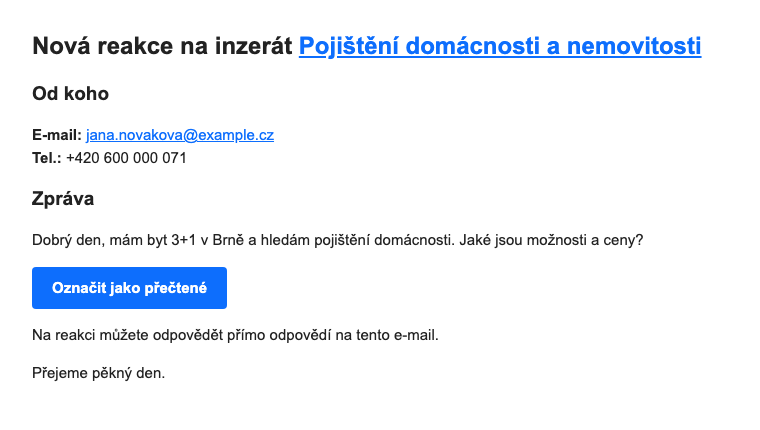
The email about a new reply, about an offer of a different price and about a reply to a company profile carries a Označit jako přečtené button under the message text. The owner uses it to mark the reply without signing in.
| What happens | Details |
|---|---|
| the key | every reply gets a random secret key when it is created; the link in the email carries the reply number and this key |
| what the link can do | only switch Read on that one reply; it shows nothing from the reply or the advert |
| validity | the link works as long as the reply exists; it can be opened repeatedly |
| invalid link | a damaged link and a deleted or non-existent reply show the same "Odkaz není platný" (link not valid) message |
| robots | a link preview, a search engine and any other recognised robot do not mark the reply |
| older replies | replies from before the button was introduced have no key and got no button in their email; the key is not added to them afterwards |
A mail program that opens links by itself marks the reply as read
Antivirus scanners sometimes go through the links in an email before a person does. So do not take the Read flag as proof that the owner really saw the reply.
The button is part of the email template
If owners do not see it, check the template under Systém → E-maily, see Email and SMTP.
The currency of an offered price#
The currency of a reply is required only with a price and may only be a public monetary one:
| Situation | What happens |
|---|---|
| the price and the currency are filled in, the currency is monetary and public | the reply is saved |
| a price without a currency | the save ends with an error (VALIDATION_FAILED, code currencyRequired) |
| the currency is internal or non-monetary (say "Kredity") | the save ends with an error (VALIDATION_FAILED, code currencyNotAllowed) |
| a currency without a price | the currency is dropped, only the reply is saved |
The form on the site guards the same ("required only when a price is filled in", and "Kredity" does not appear in the list), but the rule holds in the Api, so it applies to every write of a reply — from the site, from the administration and from an external client. The same holds for enquiries to companies in the directory (there the price is called Orientační rozpočet, indicative budget).
The currency's properties decide the list
Only currencies that are Aktivní (active), have Peněžní měna (monetary currency) ticked and do not have Interní měna (internal currency) ticked get into the list — see Currencies, VAT and units. For a currency to be offered on replies, it has to satisfy all three conditions.
Emails carry the advert's name#
The classifieds and company-directory emails — a new reply, a price offer, a saved search,
status emails, an expiry notice, following and a forgotten password — print the real name of
the advert in the heading and in the link text. They used to carry by mistake its webalized
form from the address ("my-dog-for-sale"). You set nothing; if you have your own email template
for a reply, the variable advertName in it now holds a readable name, not text for the address.
The private conversation#
A reply also starts a private conversation between the enquirer and the advert's owner. You find it in the administration in the Private messages overview. If the enquirer is signed out, or the advert has no account, the conversation can be answered by email only.
On the site the conversation is called Reakce na inzerát: the advert's name (Poptávka: subject for an enquiry to a company); in the administration you see only the subject itself. When the advert's owner marks a reply as read, the conversation is marked too — and the other way round — but only under the conditions described in the user chapter: a conversation with a newer message from the other side stays unread.
Reporting an advert#
Any visitor can report an advert. The report sets the Reported flag on the advert and appears under Inzerce → Nahlášené inzeráty (Reported adverts), where you resolve, reopen or delete it — see Reported adverts.
Go through reported adverts daily
It is the only channel through which you learn about fraudulent listings before somebody falls for one.
Saved searches#
A stored search. The user says what interests them and the system emails them as soon as somebody posts such an advert.
| Field | Note |
|---|---|
| E-mail and user | who it goes to |
| Category | subcategories included |
| Region | subordinate regions included |
| Type and brand | optional narrowing |
| Language | which language to write in |
| Active | a switched-off saved search sends nothing more — not even e-mails already waiting to be sent |
The site does not create saved searches with an e-mail, phone or IP address from the blacklist.
A saved search fires only when an advert is POSTED
Not when it is edited, nor when it is moved to another category. An advert posted into the wrong category by mistake and then moved is never announced to the right category's saved searches.
How a match is found#
The category and the region are taken including everything beneath them. A saved search on "Cars" therefore also catches "Cars → Passenger → Estate".
When e-mails go out#
According to the setting: either immediately after posting, or as a daily digest. The setting is changed in the module settings.
The daily digest contains only adverts added in the last 2 days. Older pending entries no longer make it into the e-mail, so they do not pile up after a sending outage and the user does not receive an e-mail full of long-outdated offers. A recipient without a deliverable address is dropped from the queue straight away and is not tried again.
Sent and cancelled queue entries are cleaned up daily by a scheduler job for the period set in the module settings (the Hlídací psi tab, 90 days by default).
Deleting a saved search#
You manage saved searches under Inzerce → Hlídací psi. Even a saved search that has already sent emails can be deleted — it is deleted together with its email queue, both sent and pending entries. Saved searches also disappear with a deleted category they were set up on.
Pending emails of a deleted saved search will not go out
The user does not receive even the offers the system found before the deletion. If you only want to stop the sending, switch the saved search off with Active.
When alerts do not arrive#
- Is the saved search active?
- Do the category and region fit? Did the user narrow it too far?
- Did the advert come from a posting, or was it merely edited?
- Has it exceeded the number of send attempts? After several failures the message stops being retried.
- Is the email queue running?