Roles and privileges#
A role decides what someone may do in the system. It is the single place where access is controlled — both to the administration and to content on the site.
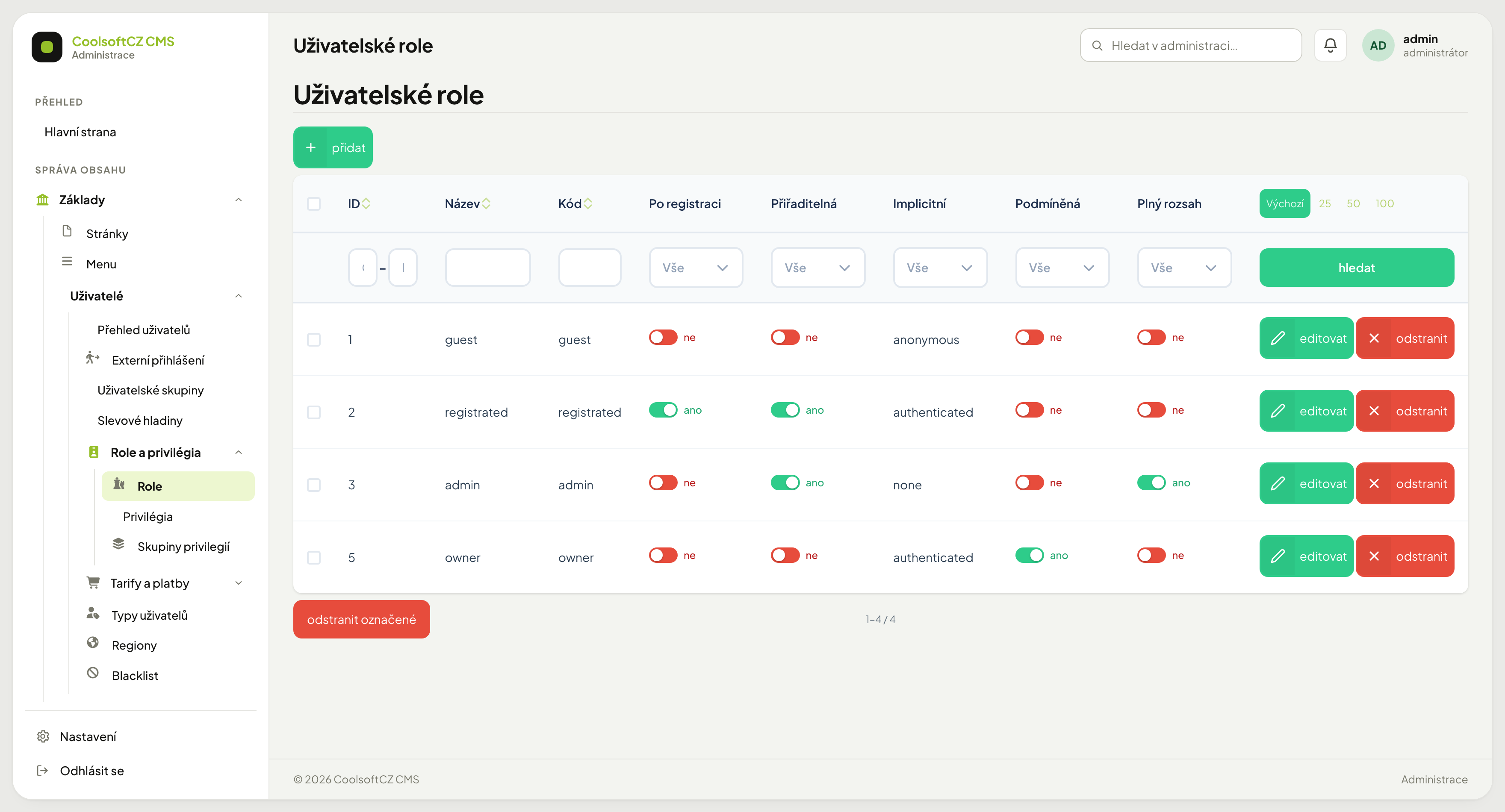
Find it under Základy → Uživatelé → Role a privilégia, which holds three screens:
| Screen | What it contains |
|---|---|
| Role | the roles themselves — who someone can be |
| Privilégia | the individual rights roles are built from |
| Skupiny privilegií | privileges bundled into groups for clarity |
Screen addresses are written in lower case
Roles, role permissions and privilege groups have the addresses /admin/system-uzivatelske-role/…,
/admin/system-uzivatelske-role-opravneni/… and /admin/system-uzivatelska-skupina/… —
like the other administration screens. Older bookmarks with a capital S at the start
(/admin/System-uzivatelske-role/…) keep working: the system redirects them to the
lower-case address, because letter case in an administration address does not matter.
How it fits together#
A user holds one or more roles. A role carries a set of privileges. When a user attempts something, the system looks for a role of theirs that allows it.
If none does, the action does not happen — in the administration the item is not even shown in the menu.
Predefined roles#
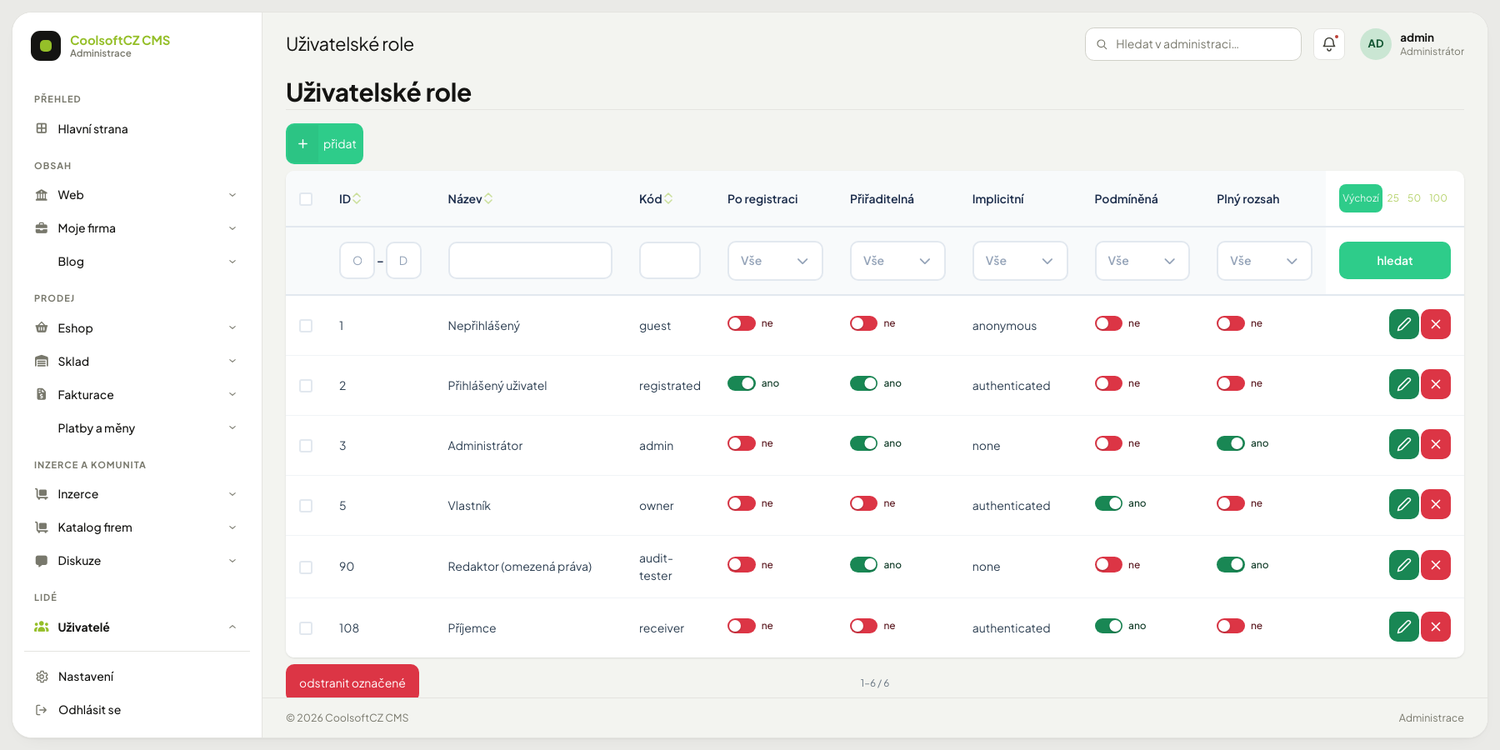
| Role | Code | Purpose |
|---|---|---|
| Nepřihlášený (Guest) | guest |
anyone not signed in |
| Přihlášený uživatel (Signed-in user) | registrated |
every signed-in user |
| Administrátor (Administrator) | admin |
system administration |
| Vlastník (Owner) | owner |
conditional — applies only to the person who created or sent the record |
| Příjemce (Receiver) | receiver |
conditional — applies only to the person the record is addressed to |
In the role list, in the role choice on a user and in the permission matrix the roles carry these names in the language of the administration; roles you created yourself keep the name you gave them.
Role flags#
Each role in the list carries six toggles. Their meaning is not self-evident:
Po registraci (after registration) — the role is assigned automatically to everyone who registers. Registered has it.
Přiřaditelná (assignable) — the role is offered in the user form. A role without this flag cannot be assigned by hand.
Implicitní (implicit) — the tie to sign-in state: anonymous (signed out),
authenticated (signed in), none (no tie; the role is assigned manually only).
Podmíněná (conditional) — the role is not assigned; it is derived at runtime from context: Owner and Receiver. You are not an owner in general, you are the owner of that one record you created, and the receiver of that one record that was addressed to you. That is why such a role is not assignable — you deliberately will not find it in the user form. How to work with it is described in the next section.
Plný rozsah (full scope) — a role whose holder also sees the protected fields of records. By default only Administrator has it.
Chráněná (protected; in the role form Chránit posledního držitele, protect the last holder) — the last active user with this role cannot be deleted, deactivated, banned, have the account deleted or lose the role. This way the system never ends up without an administrator. By default Administrator has it; details in the user overview.
It does NOT mean "passes everywhere" — privileges are still required
This is the most common misunderstanding about roles. The flag does not replace privileges: the system first asks whether the action belongs to the role at all, and only for actions that do belong to it does the flag decide how much data it sees. A role with full scope and no privileges can do nothing.
What it does switch on is access to otherwise hidden data
This flag is exactly what unlocks fields such as payment gateway credentials or password hashes. Handing it to temporary staff because "they keep missing something" exposes those too — and does not fix the missing right anyway. If a role lacks access, give it a privilege, not full scope.
Conditional roles: Owner and Receiver#
Most rights are given simply: "a signed-in user may …". For some records, though, it matters whose record it is. That is why there are two roles that are not assigned to people but decided for each record separately:
| Role | It is the one who … | Example |
|---|---|---|
| Vlastník (Owner) | created or sent the record | the author of a comment or rating; the sender of a message |
| Příjemce (Receiver) | the record was addressed to | the owner of an advert for a response to that advert; the owner of a rated profile for a reply to a rating; the other side of a private message |
Ticking a conditional role does not allow anything by itself. It says: "people in this role have this right, but let the check of that area first verify that it really is their record". A record that is not theirs is not served even if the role is ticked.
Where receiver and owner apply#
| Situation | Owner | Receiver |
|---|---|---|
| Response to an advert (classifieds and company directory) | the sender of the response, but the advert's owner may also edit or delete the response | the advert's owner may open the response detail; whoever has the link from the email may mark it as read without signing in |
| Reply to a rating | the rating's author may edit their rating | the owner of the rated profile may reply to the rating; the rating's author may not reply |
| Private messages | whoever wrote at least one message in the conversation | whoever received a message in it; after replying each side is both |
Procedure: set what the owner and the receiver may do#
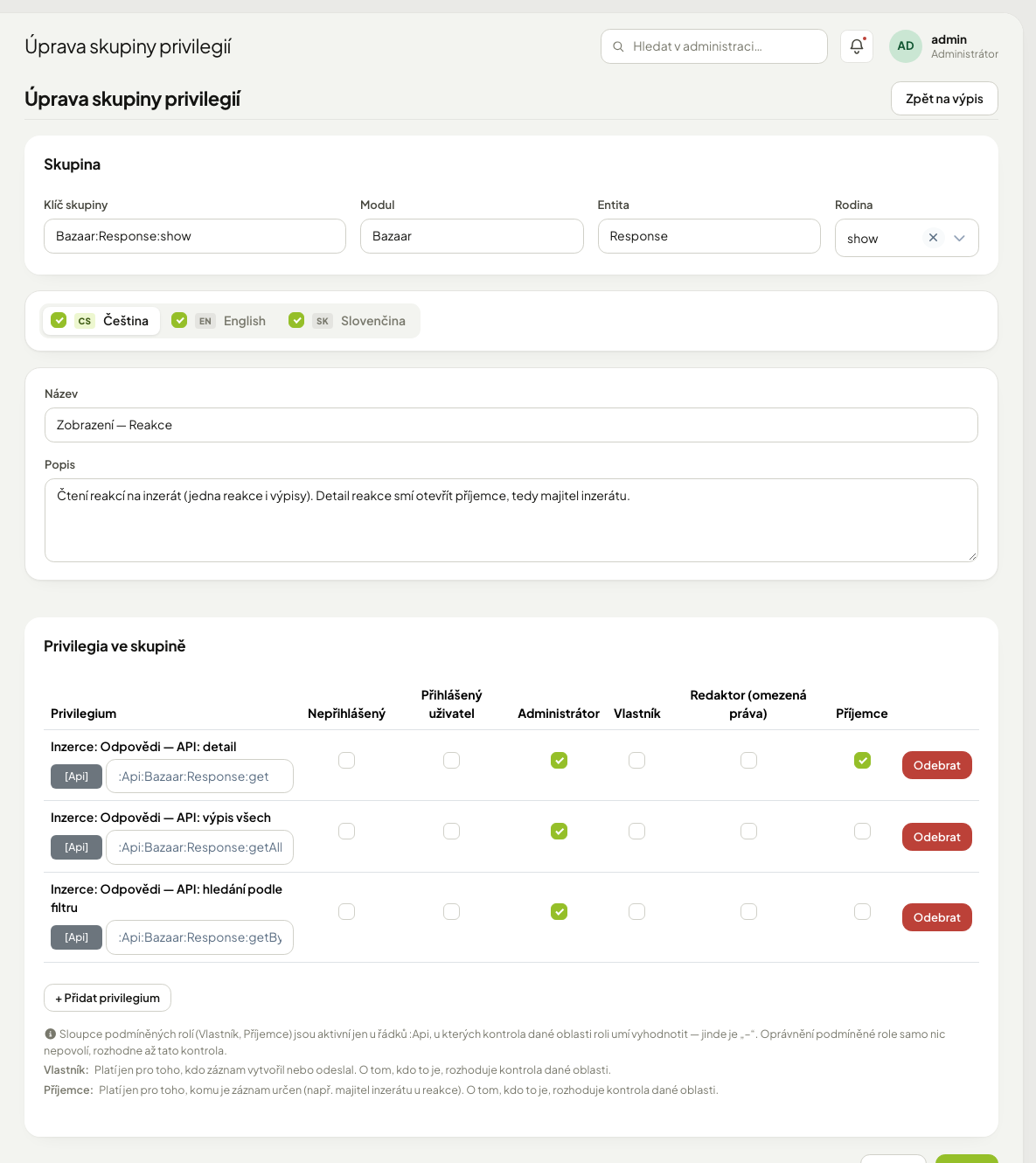
- Open Základy → Uživatelé → Role a privilégia → Skupiny privilegií.
- Open the group you want to change (say, the group for responses to adverts).
- The lower part holds the table Privilegia ve skupině: a row is one right (the name on top, the technical key below), a column is a role.
- Find the row and the Vlastník or Příjemce column. If the checkbox is active, tick or untick it.
- Click Uložit. The whole group is saved, with the table.
- Try it with real accounts: sign in as the receiver and as a stranger and check that the stranger cannot open the record.
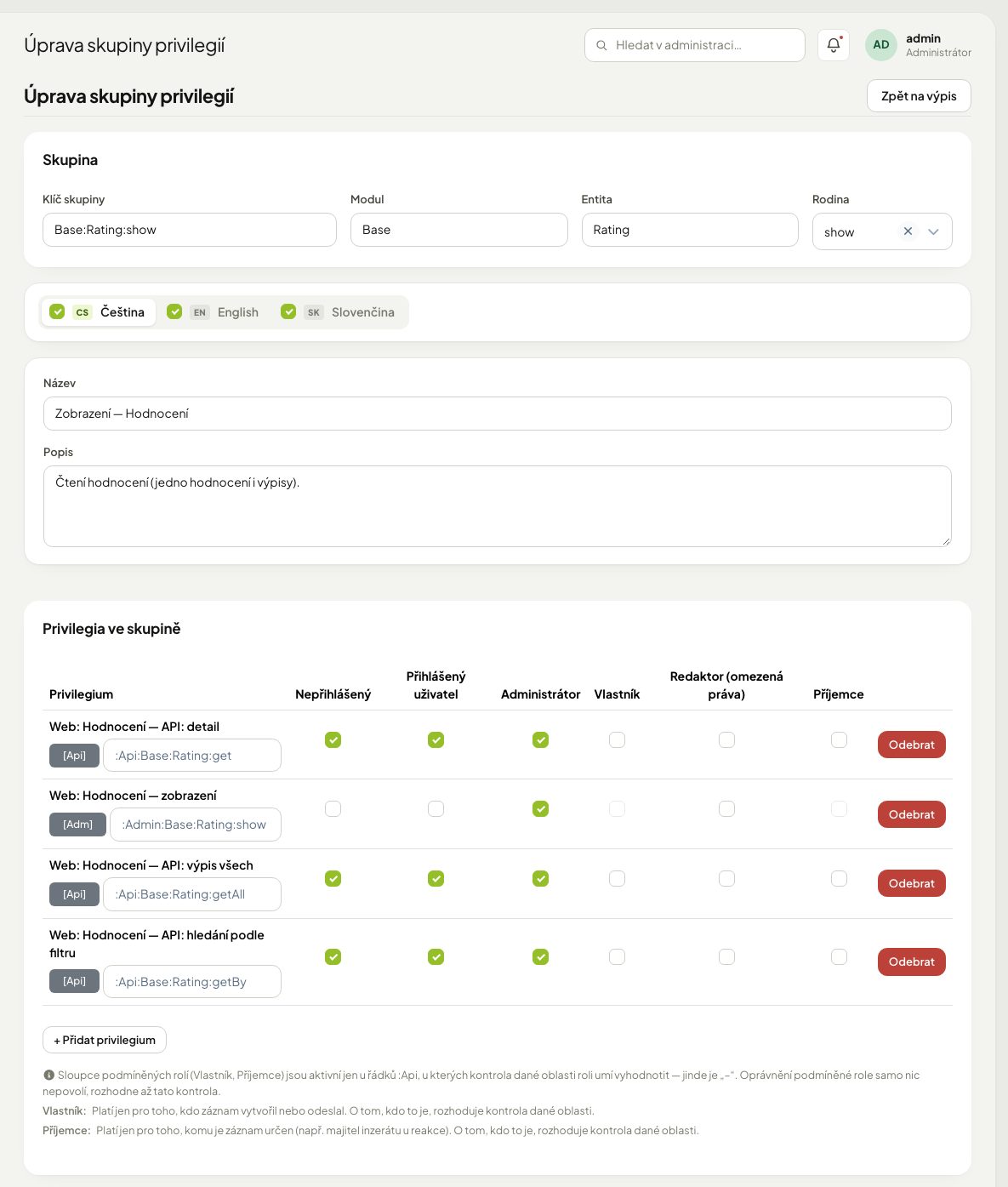
Conditional columns are active only on rows that start with :Api, and only where
that area can evaluate the role. On other rows the checkbox is disabled (grey) and a
tooltip explains why.
| A disabled checkbox means | Why |
|---|---|
the row is not :Api (it is :Admin or :Front) |
a conditional role makes sense only for rights checked by the server side of the system |
the row is :Api but the area cannot tell who the owner or receiver is |
ticking would allow nothing — for such a record the system does not know who it belongs to |
If you also give the right to "Přihlášený uživatel", the condition stops applying
An unconditional right wins. If you tick Přihlášený uživatel on the same row, every signed-in user may do the action and ticking Owner or Receiver guards nothing. To limit a right to the owner or receiver only, leave Nepřihlášený, Přihlášený uživatel and your own roles unticked on that row.
A new tick that would have no effect is not saved
If you try to switch a role on in a row where the area cannot evaluate it, the save is refused with a message naming the key and the role. The group is saved, the privileges are not — untick the marked box and save again.
An earlier pointless tick stays visible with a warning
If the database holds a right that would allow nothing, the table shows it ticked, with a yellow triangle next to the key; it can be unticked. It opens nothing, it only confuses.
Switching Receiver off on replying to a private message stops the first reply
In a new conversation the other side is only a Receiver. Someone who has not yet written anything has no Owner role. If you untick Receiver on the reply in a conversation action, the other side has no way to reply. After the first message they are also an Owner.
The link from the email works without an account
The Označit jako přečtené (mark as read) button in the response email relies on a secret key in the link, not on signing in. It can do only one thing — mark that one response as read. See Replies and saved searches.
Who may assign roles#
Only someone with the permission Systém: Uživatelé — nastavení rolí (System: Users — set roles) may add or remove a user's roles. By default only Administrator has it. Without it, the roles field in the user form is greyed out and only the other details can be edited — see Who may change roles.
Procedure: let another role change users' roles#
- Open Základy → Uživatelé → Role a privilégia → Skupiny privilegií.
- Open the group setRoles — User (described as Změna rolí uživatele…).
- In the Privilegia ve skupině table, tick the column of the role that should get the
right on both rows (
:Admin:System:User:setRolesand:Api:System:User:setRoles). - Click Uložit.
Give it only to roles you would trust with the whole system: whoever may change roles can give themselves or anyone else the Administrator role.
Schedules and dashboard statistics#
Some privileges are held only by Administrator; you have to add them to other roles yourself in Skupiny privilegií (the procedure is the same as above):
| Privilege | What it guards | Who has it by default |
|---|---|---|
:Admin:Company:Schedule:show (My company: Schedules — view) |
Schedules, the Měsíc (month) view | Administrator |
:Admin:Company:Schedule:day, …:week, …:year (My company: Schedules — day / week / year view) |
Schedules, the Den, Týden and Rok views (reservations are created in the Den view) | Administrator |
…:statistics (e.g. :Admin:Eshop:Order:statistics, :Admin:Invoicer:Invoice:statistics, :Admin:System:Payment:statistics) |
dashboard widgets with charts, totals and rankings of that area | Administrator; :Admin:Eshop:Order:statistics also every role allowed to open the e-shop statistics page (:Admin:Eshop:Statistics:show) |
The statistics privileges sit in groups named Statistics — … (for example
Statistics — Order, Statistics — Invoice). They exist for orders, complaints,
invoices, payments, users, newsletter addresses, comments, and adverts in the classifieds and
in the company directory. A statistics widget shows only to someone who has both the right to
the data itself (for example the order list) and the matching …:statistics privilege.
Creating your own role#
- přidat in the role list.
- Name and code. The code is technical: no diacritics, no spaces.
- Turn on Přiřaditelná so the role can be picked on a user.
- Leave Po registraci off unless every new user should get it.
- Leave Podmíněná and Plný rozsah off.
- Save, then assign privileges.
Suggested setups#
Editor — writes content, does not touch money: pages, articles, news, galleries. No e-shop, invoicing, payments, users or settings.
E-shop manager — processes orders: orders, products, prices, stock, complaints. No users, roles or system settings.
Bookkeeper — documents: all of invoicing, read access to orders. No content, no settings.
Add rather than remove
Create a role with the bare minimum and add whatever people report they cannot do. The opposite approach — grant everything then take away — leaves doors open in places nobody thinks of.
Verifying what a role can actually do#
Configuration is not the same as reality. Before handing a role over:
- Create a test account and assign the role to it.
- Sign in as that account in a different browser (or a private window) — otherwise you lose your own session.
- Walk through what appears in the menu.
- Try opening an address the role must not reach. It must not go through.
A hidden menu is not a prohibition
An item missing from the menu does not mean the address cannot be reached. Verify by clicking through, not by looking at the menu.
Why a colleague sees something different#
Most often:
- they hold a different role,
- they hold several roles and the rights add up,
- their role holds a privilege you overlooked,
- your site does not have that module enabled (then nobody sees it).