Notifications#
Alerts for administrators — the bell in the administration header.
Find them under Systém → Notifikace and → Typy notifikací.
The notification type#
Says what the alert is about.
| Field | Note |
|---|---|
| Module | which one it belongs to |
| Page | where the alert links through to |
| Icon | how it looks in the list |
| Active | a disabled type creates no new alerts (exceptions: see Disabling a type) |
The link to a page is the essential part
An alert you cannot click through to the thing it concerns is not read twice.
The bell in the header#
The bell is in the header on every administration page. If it has a red dot next to it, an unread notification is waiting for you.
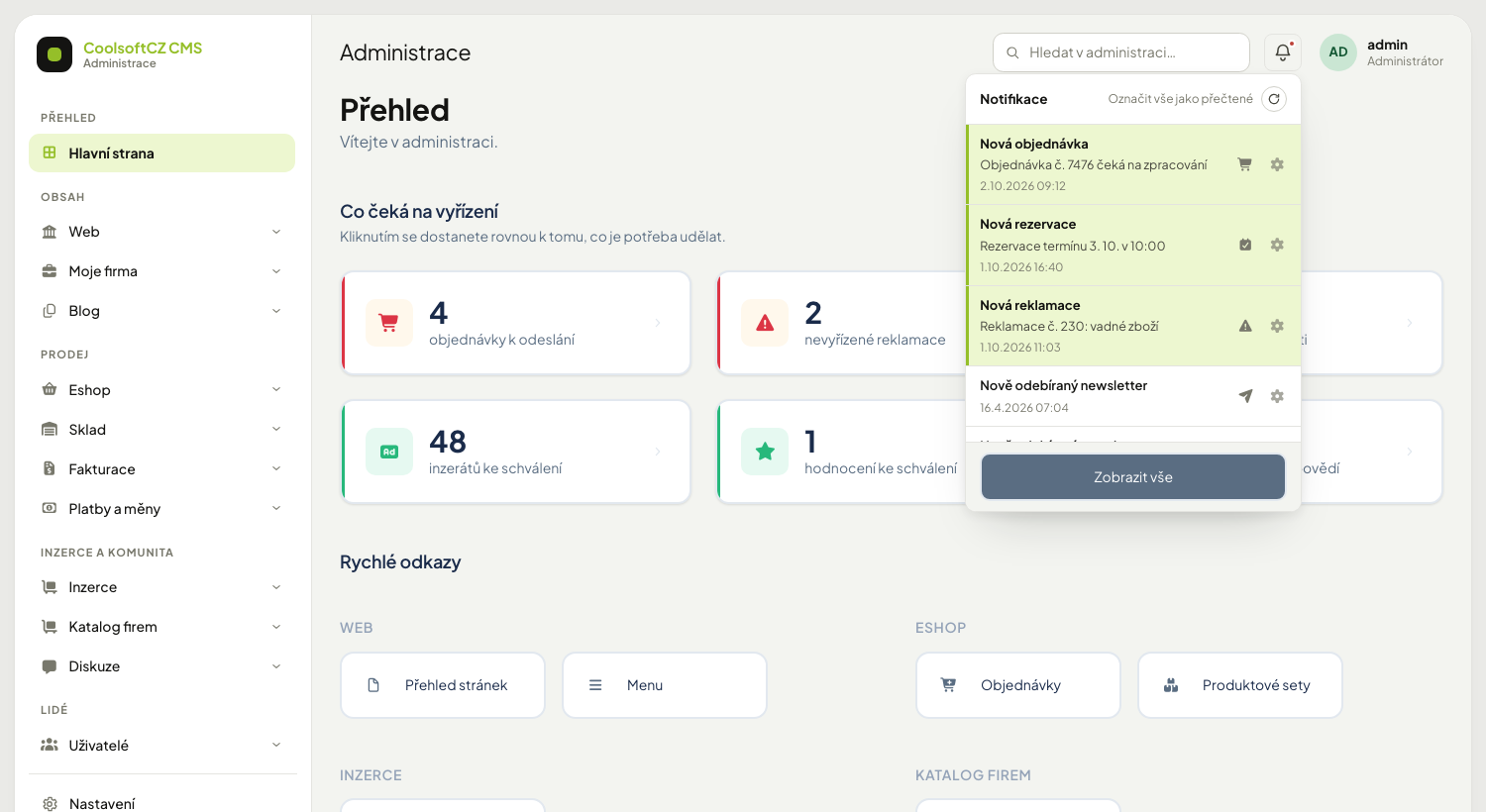
Clicking it shows the last ten notifications, newest on top. Each one shows the type name and clicking it takes you straight to the record it concerns (an order, say). The cog next to a row opens the notification itself for editing.
| Control | What it does |
|---|---|
| the circular arrow (Aktualizovat výpis) | loads new notifications without reloading the page |
| Označit vše jako přečtené (only when there is something to mark) | marks the unread ones that are yours or shared |
| Zobrazit vše | opens the full overview under Systém → Notifikace |
Whose notifications the bell shows#
A notification can have a receiver — a specific user. That splits them into two kinds:
| Kind | Receiver | Who sees it |
|---|---|---|
| Yours | you | only you |
| Shared (global) | empty | all administrators; once one marks it, it is read for everyone |
A notification meant for another user does not show in your bell and "mark all" does not read it. Without signing in the bell is empty.
A shared notification is confirmed together
If a colleague reads it, it disappears from your unread too. That is intended — it is a task for the team.
A link is offered only with permission
The bell and the overview offer a direct link to the record only when you may open it. Otherwise only the notification's own detail is offered. That way you do not land on an "Access denied" page.
The notification#
The full overview is under Systém → Notifikace.
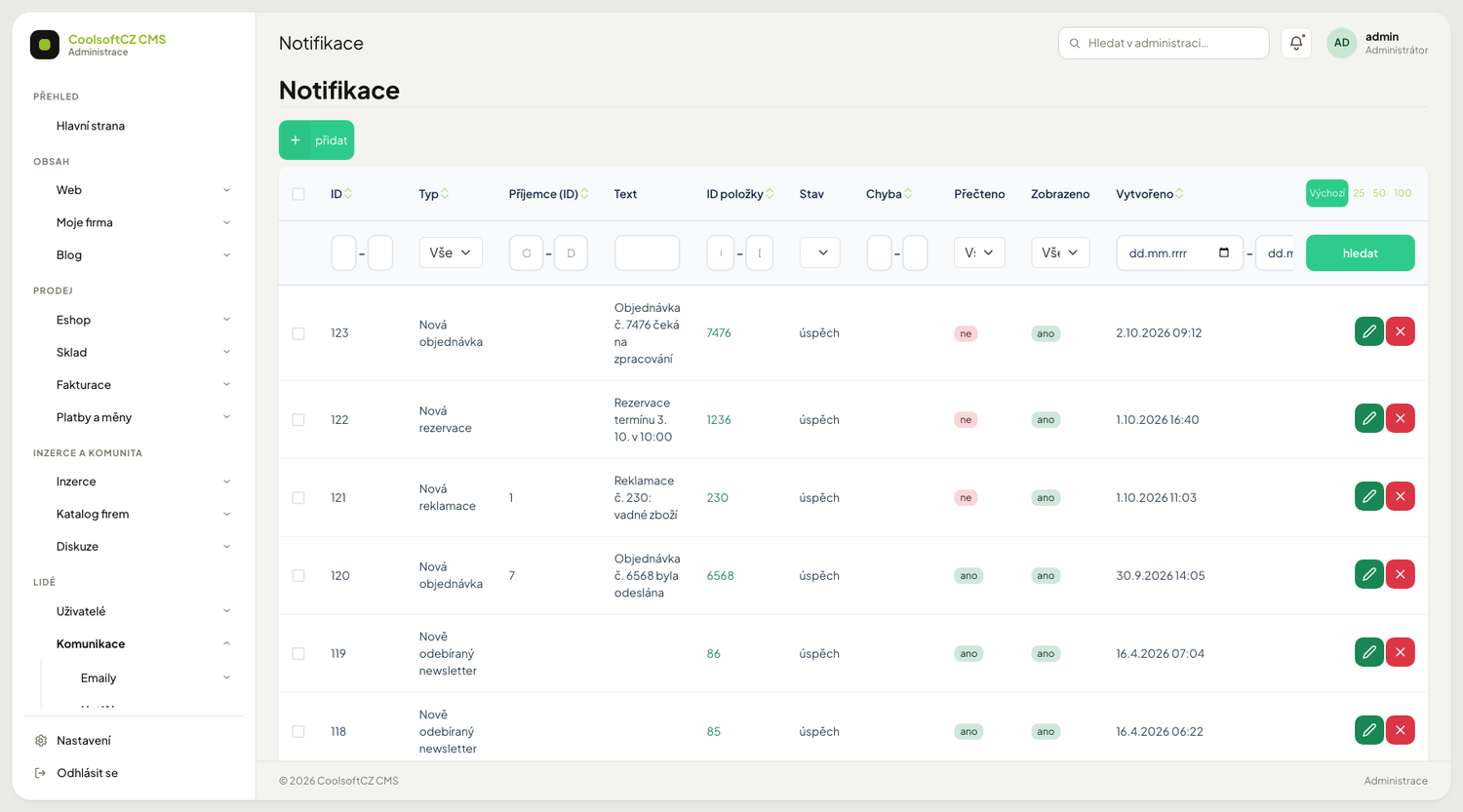
| Field | Note |
|---|---|
| Type | what it concerns |
| Receiver | whose it is — first and last name (the username when there is no name), as a link to the user edit if you may open it; a shared notification shows "all administrators" (in the Czech interface „všichni správci“). Sorting and filtering work on the user number |
| Text | |
| Read | confirmed in the bell (or in the notification edit) |
| Shown | already listed in this overview |
| Status and error code | on alerts about problems |
| Created at |
Opening the overview marks the not yet shown notifications on the page as shown (the Read flag is different and changes in the bell). Marking happens only when you open the overview from within the administration; a link planted on a foreign page shows the overview but marks nothing.
Procedure: send a notification to one person#
- Under Systém → Notifikace choose přidat (the Nová notifikace form).
- Pick the Typ notifikace.
- In the Příjemce field enter the user (suggestions, or the picker window). Leave the field empty and the notification is shared by all administrators.
- Optionally fill in the Text and ID položky (the record the link should lead to).
- Save.
What triggers an alert#
| Type | When it is created | Receiver |
|---|---|---|
| new order, new payment, payment completed | a customer orders or pays on the site | all administrators |
| Payment paid again (Platba uhrazena znovu) | the customer paid the same payment once more: the gateway confirmed another transaction and the tariff was activated (extended) again. The text reads "Platba #… uhrazena znovu (další transakce)" and the link leads to the payment detail | all administrators |
| new complaint | a customer files a complaint | all administrators |
| new registration, new newsletter address | a visitor registers or subscribes | all administrators |
| new contact-form message | a visitor submits the form | all administrators |
| new booking | a booking is made in Moje firma | all administrators |
| finished product import | an e-shop import completes | whoever started the import (otherwise everyone) |
| Platba objednávky vyžaduje zásah (order payment needs attention) | a payment arrived that does not settle the order: the goods ran out meanwhile, the order was cancelled, or the payment is lower — see Orders | all administrators |
| E-mail se nepodařilo doručit (email could not be delivered) | a message in the email queue used up all its sending attempts and was stopped. One sending run creates only one notification, even when several messages failed | all administrators |
| Cron job keeps failing (Úloha cronu opakovaně selhává) | an item of an automatic job (for example a document or an order expiry) failed five times in a row — see Job scheduler. One notification is created per queue and it links to Nastavení → Cron. Once the item is processed successfully, the notification turns into plain text without a link at the next detaching of orphans | all administrators |
Alerts about a new record (order, payment, registration…) are created only by actions on the site; when you create a record yourself in the administration, no notification is created.
A notification is not a substitute for email
You see it only while you are in the administration. For anything that cannot wait, have an email sent.
Disabling a type#
With the Aktivní (active) toggle on the notification type. A disabled type creates no new alerts; those already created stay. The toggle applies to every type without exception.
Notifications for a deleted record#
A notification can outlive the record it belonged to — an order, user or payment is deleted, but the alert about it remains. The system does not delete such a notification: it detaches it from the deleted record. It keeps its type, text and time; the bell and the overview just show it as plain text without a link, so it never takes you to an error page.
When you delete a record in the administration, its notifications are detached at once. Records that disappeared some other way are detached by:
- the Odpojit osiřelé (detach orphaned) button above the overview in Systém → Notifikace (you need the right to delete notifications). The system goes through the last 500 notifications that still point to a record, detaches those whose record no longer exists and reports how many there were,
- a scheduled server job (Odpojení osiřelých upozornění v administraci od smazaného záznamu, detaching orphaned admin notifications) that runs at most once a day (the list of jobs is in the chapter Scheduled jobs). Unlike the button, it gradually goes through the whole history: each run checks the next 500 notifications older than where the previous run stopped, and after the oldest ones it starts again from the newest.
Merely displaying the bell or the overview changes nothing. You delete a detached notification like any other, or the daily job deletes it once read (see below).
Deleting read notifications#
Read notifications older than the set number of days are deleted by a daily scheduler job (Clean old read admin notifications). Unread ones always stay. You set the number of days in Nastavení → Nastavení webu, the Cron section, the Keep read notifications (days) option; an empty value means 90 days, and 1 to 3650 is accepted.
Detaching works only for the types the system knows
The existence of a record is checked by the e-shop, system, base, blog and company modules, each for its own types. A notification of a type that no module checks keeps its link even after the record is gone. The same applies when the check fails — better a link that leads nowhere than a valid notification losing its link.
Ones older than a month can be deleted
A bell with a thousand items stops being opened by anybody. That is why a daily scheduler job deletes read notifications by itself after a while (see below).