Private messages#
Conversations between two sides — typically between an interested person and the owner of an advert; an administrator can invite another participant (an arbiter, say). Here you see them from the administrator's point of view. For users they are described in the chapter Private messages.
Find them in the administration menu under Soukromé zprávy. An installation creates it on the first level of the menu; the operator can drag it under another section.
Where conversations come from#
| Origin | How it comes about |
|---|---|
| Odpověď na inzerát (bazar) (response to an advert, classifieds) | an enquirer sends a response on an advert |
| Odpověď na inzerát (katalog firem) (company directory) | an enquirer sends a response on a company profile |
| Založeno v administraci (created in the administration) | you create it by hand, see below |
A user cannot start a new conversation on the site: it arises only from an action (a response to an advert). The first message is the text of the response.
The overview#
A row is one conversation, the liveliest on top.
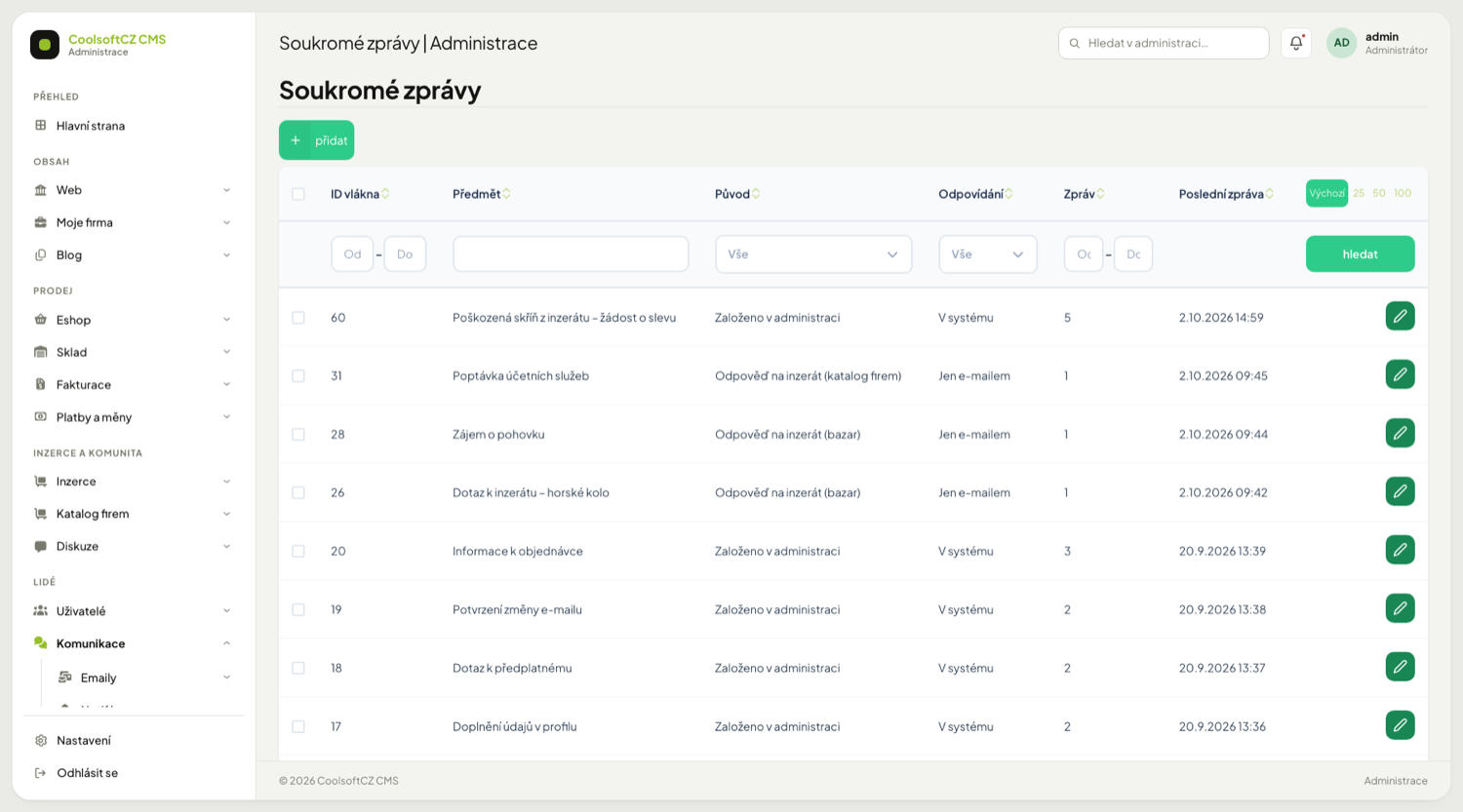
| Column | What is in it |
|---|---|
| ID vlákna (thread ID) | the conversation number |
| Předmět (subject) | for a conversation from a reply, the advert's name (classifieds) or the enquiry's subject (directory), without a prefix. On the site "Reakce na inzerát:" or "Poptávka:" is added in front of it |
| Původ (origin) | one of the values in the table above |
| Odpovídání (replying) | V systému (both sides have an account) or Jen e-mailem (email only: at least one side is a signed-out guest) |
| Zpráv (messages) | how many messages were added to the conversation (deleted ones are not subtracted) |
| Poslední zpráva (last message) | when |
The overview can be filtered by ID, subject, origin, replying mode and message count. Participants are not columns, so they cannot be filtered; you see them in the detail.
A conversation without a single undeleted message is invisible to users, not to you
If all the messages of a conversation are deleted (outside the application), it disappears from users' box, from the Jen nepřečtené filter, from the number at the icon, and its detail does not open. It stays in the administration overview and the detail shows even the deleted messages. If a new message is added to it or one is restored, it returns to the users.
The detail#
Open it with the button on a row (green, with a pencil icon and the caption "detail"). The messages and the summary are read-only; you can add and remove participants (see below):
| Part | What it shows |
|---|---|
| Summary | subject, origin, replying mode, message count (and "uzavřeno" — closed — if the conversation is closed), time of the last message |
| Participants | the participant's username, for an account with a name in the form "username — first and last name" (how others see them on the site), their role in the thread (odesílatel sender / příjemce recipient; who started the conversation) and status (aktivní active / odebrán removed), for a guest their email and phone; for an active one the number of unread messages and the notes "smazáno u účastníka" (deleted for the participant) and "archivováno" (archived), for a removed one the time of removal; an active one has a Odebrat button |
| Přizvat dalšího účastníka | a user picker and the Přidat účastníka and Připojit se ke konverzaci buttons |
| Messages | messages from the oldest, with author and time; deleted messages are greyed out and marked |
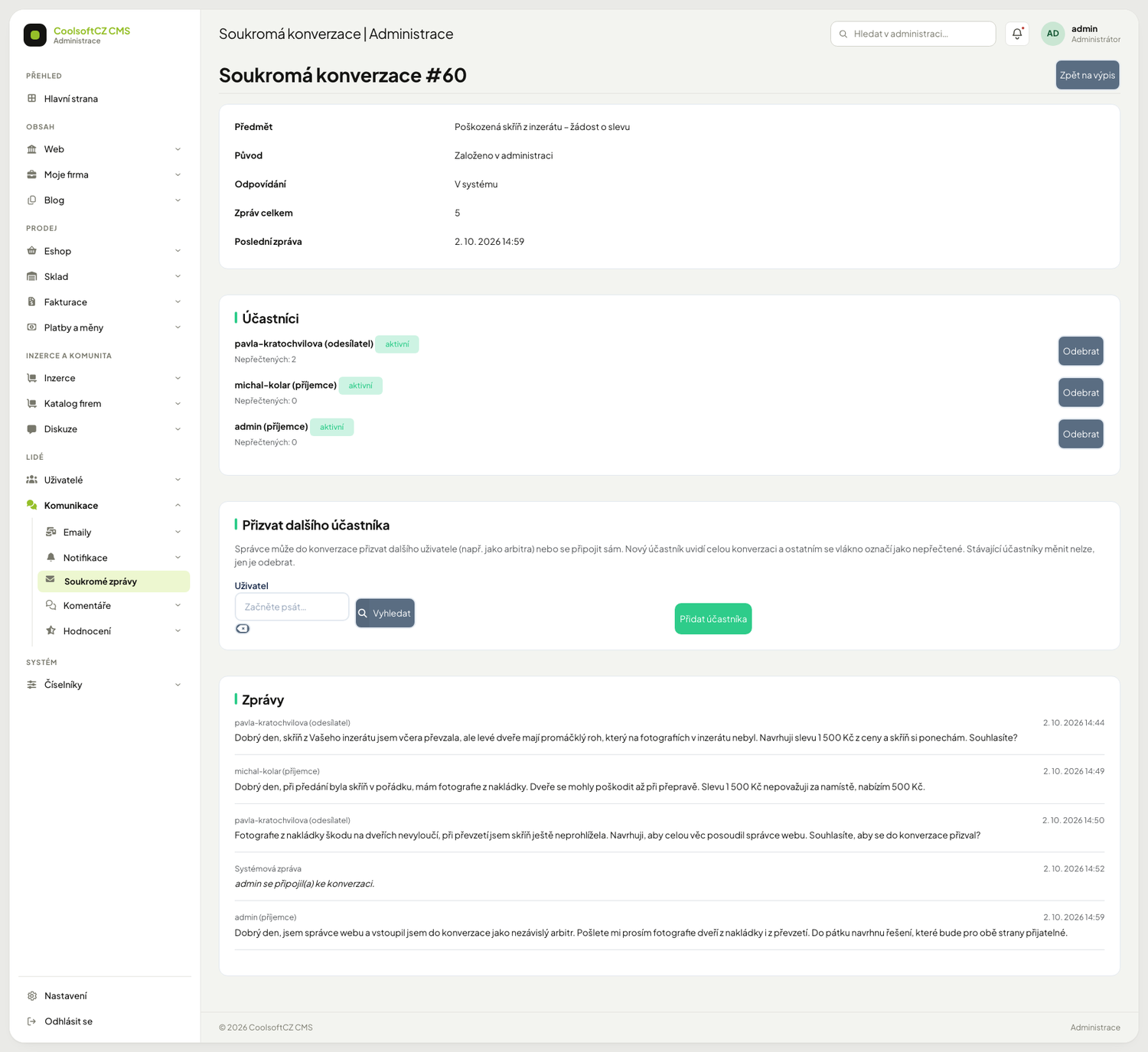
A message from the system (without an author) is signed Systémová zpráva; a participant joining or leaving is written in it as a sentence ("… se připojil(a) ke konverzaci.", "… opustil(a) konverzaci."). Messages of a removed participant carry the odebrán badge next to the name.
Private messages can contain personal data
A conversation is private between two people and you see it as an administrator. Read it only when you are dealing with a complaint, abuse or a technical problem, and do not copy the content anywhere.
The detail does not show who read which message
For a participant there is only the number of unread messages. The "Přečteno" badge that users see is not shown in the administration, see the next section.
Procedure: invite another participant#
You can invite another user with an account to a conversation under way — typically an arbiter in a dispute.
- In the Soukromé zprávy overview open the conversation with the "detail" button on its row.
- Below the list of participants find the Přizvat dalšího účastníka (invite another participant) block.
- In the Uživatel (user) field enter the user (suggestions, or the picker window).
- Click Přidat účastníka (add participant). The page returns to the detail with the message "Účastník byl přidán do konverzace." (the participant was added).
The new participant sees the whole conversation from the first message, and every message is unread for them. For the other participants the thread is marked unread too, and a system message "… se připojil(a) ke konverzaci." (… joined the conversation) is written into the conversation. Nothing is sent by email.
Procedure: join a conversation as an administrator#
- Open the conversation detail.
- In the Přizvat dalšího účastníka block click Připojit se ke konverzaci (join the conversation). You do not have to pick a user: the account you are logged in with is added.
- The page returns to the detail with the message "Připojili jste se ke konverzaci." (you joined the conversation).
- You then find the conversation in your inbox on the site (Přijaté) and can write in it like any other participant.
The button is not offered when your account is already an active participant of the thread.
Procedure: remove a participant#
- In the conversation detail click Odebrat (remove) next to the participant in the Participants list.
- Confirm the question "Opravdu odebrat účastníka z konverzace? Přestane ji vidět, jeho zprávy ve vlákně zůstanou." (really remove the participant; they stop seeing it, their messages stay) in the window Odebrání účastníka, buttons Odebrat and Zrušit. The page returns to the detail with the message "Účastník byl z konverzace odebrán." (the participant was removed).
The removed participant stops seeing the conversation (it disappears from their inbox and from the number at the icon, and its address shows them an error). Their messages in the thread stay, signed with their name, with "(opustil konverzaci)" (left the conversation) added next to them. A system message "… opustil(a) konverzaci." (… left the conversation) is written into the conversation. The participant list keeps the row with the odebrán (removed) badge and the time of removal. You can add a removed participant again; they again see the whole conversation, and all messages are unread for them.
Limits#
| Rule | Why |
|---|---|
| a thread has at most 10 active participants | adding an eleventh is refused with the message "Ve vlákně už je nejvyšší povolený počet účastníků (10)." (the thread already has the maximum number of participants) |
| at least 2 active participants must remain | instead of the Odebrat button you see "Ve vlákně musí zůstat aspoň 2 účastníci." |
| participants are not managed in a "Just by email" conversation | the other side is a visitor without an account, the emails would not be delivered; the block explains why it is unavailable |
| participants are not managed in a closed conversation | the same, the block is unavailable |
| only a user with an activated and not blocked account can be added | otherwise the message "Uživatel nemá aktivovaný účet." or "Uživatel je zablokovaný." |
| a user cannot be added twice | "Tento uživatel už je účastníkem konverzace." (even if they hid the thread) |
Participants cannot be added or removed from the site
Users do not change participants among themselves; it is an administration-only action. The buttons are seen and usable only by someone with the permission to edit private messages in the administration and the matching keys of the Soukromé zprávy group (see Permissions below).
Read receipts#
The operator can turn on that a sender sees a Přečteno (read) badge on their own message once the other side has opened it. By default it is off.
Procedure: turn read receipts on#
- Open Nastavení → Nastavení webu.
- Find the section Soukromé zprávy and tick Potvrzení o přečtení zpráv.
- Click Uložit. The change applies at once; you need not clear anything.
- Check with two test accounts: the first writes a message, the second opens it, and the first then sees Přečteno on that message in the conversation detail.
If you switch the toggle off again, the badges disappear from the details at once as well.
| Rule | How it shows |
|---|---|
| only the sender of their own message sees the badge | on the other side's messages and on system messages it is not shown |
| a guest without an account is not covered | a guest does not read in the system, so never has it |
| it applies per conversation, not per message | a message counts as read when the other side opened the conversation after it was sent |
The "Přečteno" badge can appear a moment before the other side saw the message
The time of opening is compared with the time of the message to the second. If a message is written in the same second in which the other side opened the conversation, the badge shows on it even though they have not seen it yet. Treat it as approximate.
Turning it on tells users when somebody looked
It is information about another person's behaviour. Before you turn the toggle on, consider whether it fits the site's privacy policy and whether you will tell users. Once the badges are visible they cannot be switched off for one user only — the toggle applies to everybody.
What cannot be done with conversations#
| I want | Answer |
|---|---|
| write a message on a user's behalf | not possible; participants write the messages |
| edit a message | not possible, see above |
| change the participants | only add and remove, see invite a participant |
| delete a conversation | not possible in the administration; a user can only hide it for themselves |
| find out who replied to whom | in the detail by the author and time of the messages |
Procedure: start a conversation by hand#
- In the Soukromé zprávy overview click přidat.
- In the Odesílatel (sender) field enter a user (suggestions, or the picker window).
- In the Příjemce (receiver) field enter the other user.
- Optionally fill in the Předmět (subject, up to 255 characters).
- Write the Zpráva (message) — it is saved as the first message of the conversation (required).
- Save.
The conversation shows to the receiver as unread, to the sender as read.
The sender and the receiver must be two different users
If you do not pick both, or pick the same one, the system does not create the conversation and reports it with a message. A guest (without an account) cannot be entered this way.
Messages and existing participants cannot be changed
A message cannot be edited: that would rewrite who sent what. The participants of a conversation under way can only be added and removed, not swapped. A wrongly created conversation is therefore not fixed by swapping the sender; you create a new one or remove the wrong participant.
Permissions#
The overview and the detail need the corresponding permissions; the detail also needs the
permission to edit (:Admin:Base:MessageThread:edit), which is checked on the server too.
Without it the "detail" button is not offered and a hand-typed address ends in a refusal.
They are assigned in Roles and privileges.
Managing participants is also controlled by two keys of the Soukromé zprávy group (addParticipant — add a
participant and removeParticipant — remove one; in the matrix they are :Api:Base:MessageThread:…).
After installation only the Administrator role has them; you give them to another role in the permission matrix. If a
key is missing, the action ends with the generic message "Akci se nepodařilo provést." and nothing in the conversation changes.
Permissions for users and for administrators are different
What a user may do with a conversation on the site (read, reply, hide) is set in the permission matrix for the roles Vlastník and Příjemce, see Conditional roles.