Replies to an advert#
How people get in touch#
An interested person fills in the form on your advert. The message reaches you by email, and you can reply directly to the sender.
Your email is not shown publicly
This is why the form is used. It protects you from bulk mailings.
A response also starts a private conversation between the enquirer and you. If you are signed in and so is the enquirer, you can keep writing on the site, see Private messages. When a signed-out visitor responded, you see their contact on the conversation and reply by email.
Procedure: reply to somebody else's advert#
This part is for the one who gets in touch. The advert's owner sees it from the other side.
- On the advert, click Odpovědět na inzerát (Reply to the advert). A window with a form opens.
- Fill in Váš e-mail (your email, required), optionally Váš telefon (your phone), and write the Zpráva (message, required).
- If the advert allows a price offer, the form also has Nabízená cena (offered price) and Měna (currency). Fill in the price only if you want to offer one.
- Click Odeslat zprávu (Send the message).
A sold advert cannot be replied to
An advert with the Sold notice has no Odpovědět na inzerát button.
The blocked message
If after sending you see "Sending is not allowed: the e-mail, phone or IP address is blocked.", the site operator has blocked your e-mail, phone or connection and the message was not sent. Contact the operator.
| Field | Behaviour |
|---|---|
| Váš e-mail, Váš telefon | when you are signed in, the form fills them in from your account (the phone only if you have one in your profile); you can overwrite or delete them and your edit stays. Nothing is pre-filled for a visitor who is not signed in |
| Nabízená cena | optional |
| Měna | required only with a price. Without a price you do not choose it and it is not saved |
“Kredity” (Credits) are not in the currency list
The currency of the price is always a real monetary currency. The site's internal currencies, such as Kredity, are not offered next to the price in a reply and the system does not accept them by any other route either.
The email the owner receives carries the name of the advert (not its internet address). The same holds for the emails the site sends about a saved search, following, an advert's expiry and a forgotten password — instead of an address with hyphens you see the real name.
An enquiry to a company in the directory#
A company profile has a Kontaktovat (Contact) button and a Nezávazná poptávka (Non-binding enquiry) window. It additionally requires a Předmět (subject) and has an Orientační rozpočet (indicative budget) with a Měna instead of an offered price — the same rules apply: the currency is required only when you fill in the budget, and only monetary currencies are offered. The company owner sees the Předmět in the list of enquiries (the Předmět column) and in the enquiry detail.
How many messages you can send#
To stop mass mailing, the site limits replies to adverts and enquiries to companies:
| Limit | How many |
|---|---|
| from one connection in total | at most 10 messages per hour |
| from one connection to the same advert (the same company) | at most 3 messages per hour |
Over the limit you see "You have sent too many messages in a short time. Please try again in N min at the latest." (for a company "… too many inquiries …"). When the site does not know the waiting time, the message ends with "… Please try again later." Such a message is not saved and does not reach the owner — send it again once the time has passed.
Where to find the replies#
| Place | What is there |
|---|---|
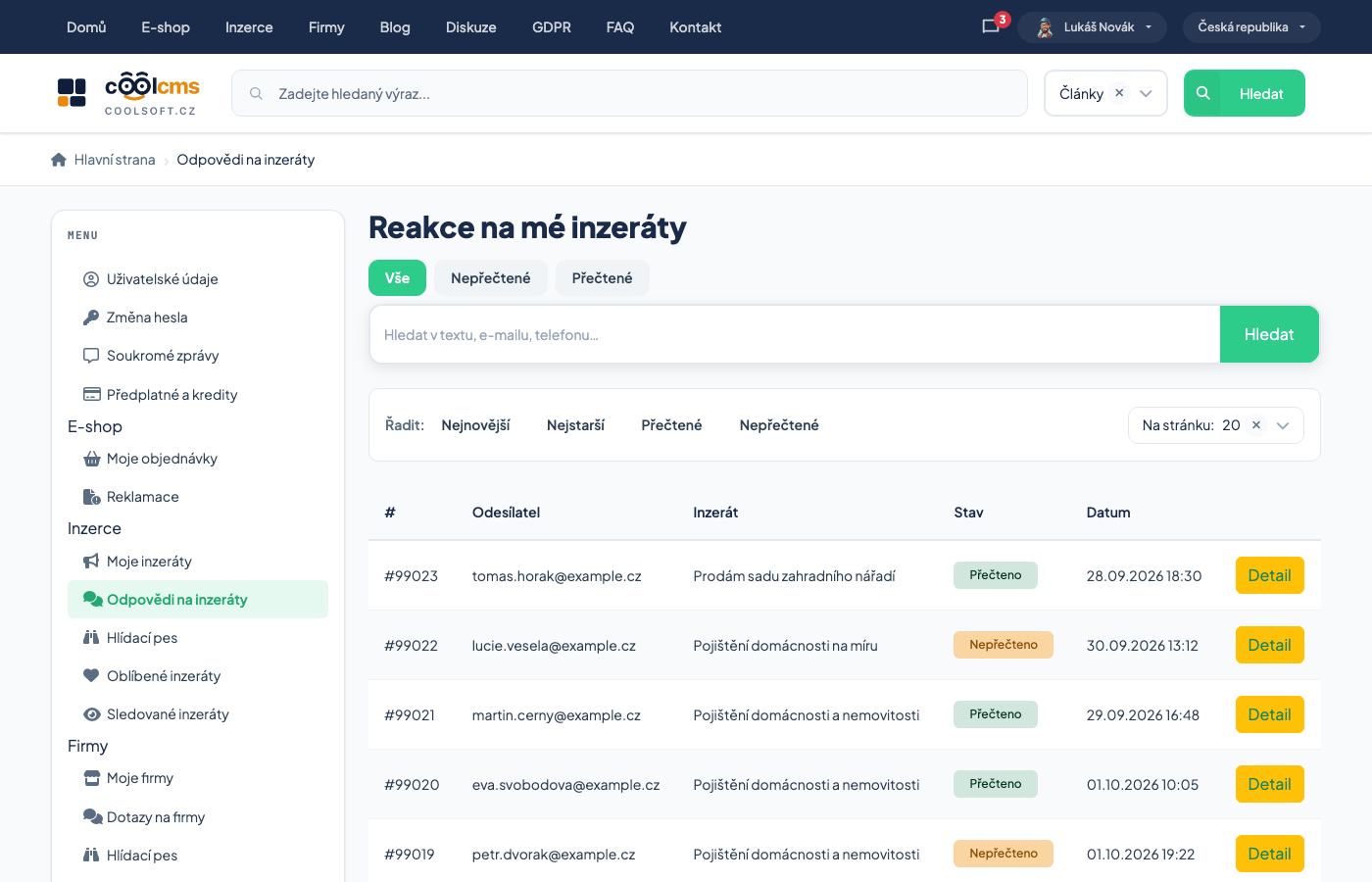
| Reakce na mé inzeráty (responses to my adverts) | an overview of all replies to all your adverts |
| the Replies tab on the advert's edit screen | replies to that one advert — even if you have it only with a password |
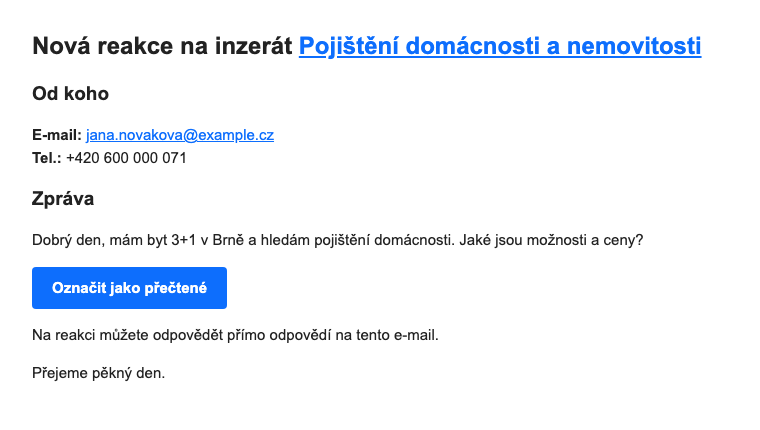
| the email about a new reply | the text of the message and the Označit jako přečtené (mark as read) button |
In the Reakce na mé inzeráty overview you see for each reply the sender, the advert, the state (read / unread) and the date. At the top you switch Vše / Nepřečtené / Přečtené (all / unread / read) and the Hledat (search) field searches the text, email and phone. The Detail link opens the whole reply — with the message, phone and a possible offered price.
An email can be missed, the overview cannot
When you are not sure whether something slipped into spam, go through the overview of replies — it is the complete list, not just what reached your mailbox.
Procedure: read the replies#
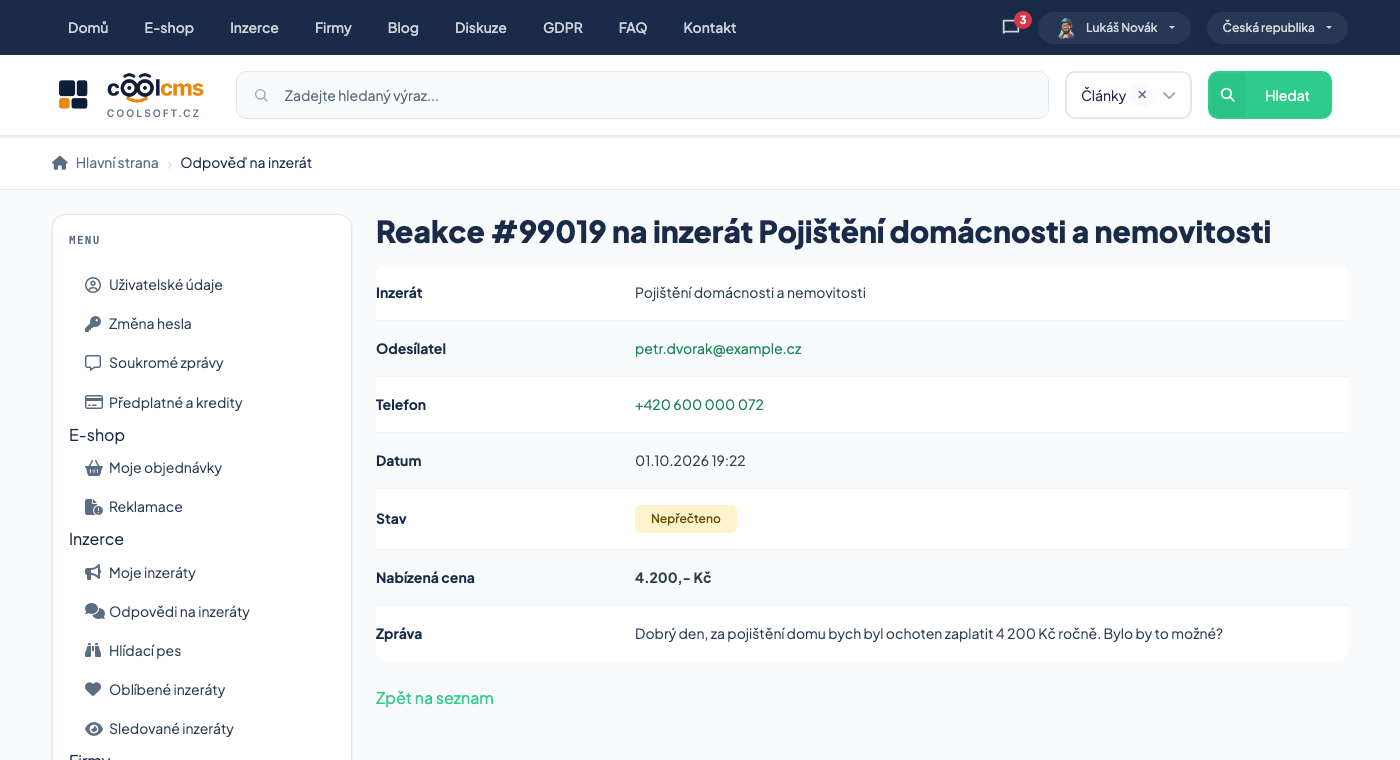
- Sign in and open Reakce na mé inzeráty.
- Switch to Nepřečtené.
- Click Detail on a reply.
- Opening it marks the reply read by itself and it leaves the unread ones.
Only the advert's owner can open the detail
A reply is seen by the one it was addressed to. A different signed-in user cannot open the detail (an error is shown) and the sender of the reply naturally does not have it in the owner's overview.
The same holds for replies to a company profile in the company directory: the overview, the detail and the email button work the same way.
A link from the email opened in the mail client's browser does not mark the reply
The detail is marked as read only when you click through from the site. If you open its address from another page (webmail, say), you see the reply but it stays unread. Use the Označit jako přečtené button in the email (see below), or open the detail from the overview on the site.
A reply and a conversation are read together#
A reply to an advert creates a private conversation, so the advert's owner can see "the same" thing in two places — as a reply and as a conversation. The site unifies the two records of reading so that one of them does not stay unread:
| What you do | What happens |
|---|---|
| you mark a reply as read (open the detail, the window on the advert edit, or click the button in the email) | the linked conversation is marked read too — but only when its only unread message is the first one, the one from the reply |
| the other side has written another message in the thread since | the conversation stays unread; you will see the new message |
| you open the conversation (as the advert's owner) | the linked reply is marked read too |
The unification concerns the advert's owner with an account. The conversation is always marked for the owner, never for the one who triggered the action — whoever opens the link from the email without signing in gains nothing extra. An advert without an owner's account has no conversation, so there is nothing to unify.
The "Mark as read" button in the email#
The email about a new reply to an advert (and about an offer of a different price) has a blue Označit jako přečtené button under the text of the message. It marks the reply without you signing in.
Procedure: mark a reply from the email#
- Open the email about the new reply.
- Click Označit jako přečtené.
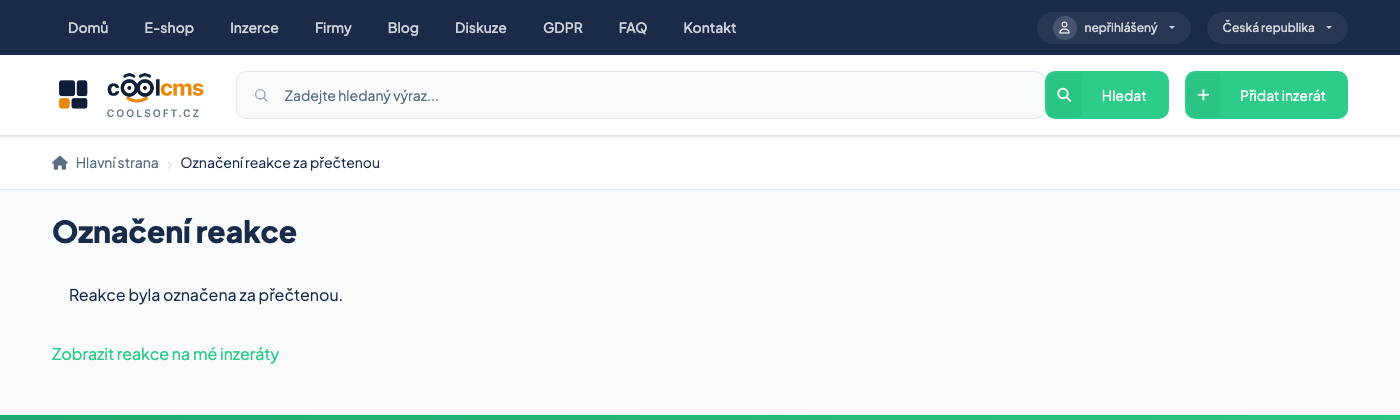
- A page opens with the message Reakce byla označena za přečtenou (the response was marked as read) and a link Zobrazit reakce na mé inzeráty (show responses to my adverts).
The link also works repeatedly: open it again and you see the same message.
The page shows nothing from the reply
Only the message. That is deliberate — the link is opened by a signed-out person, and anyone who intercepted it learns nothing from it.
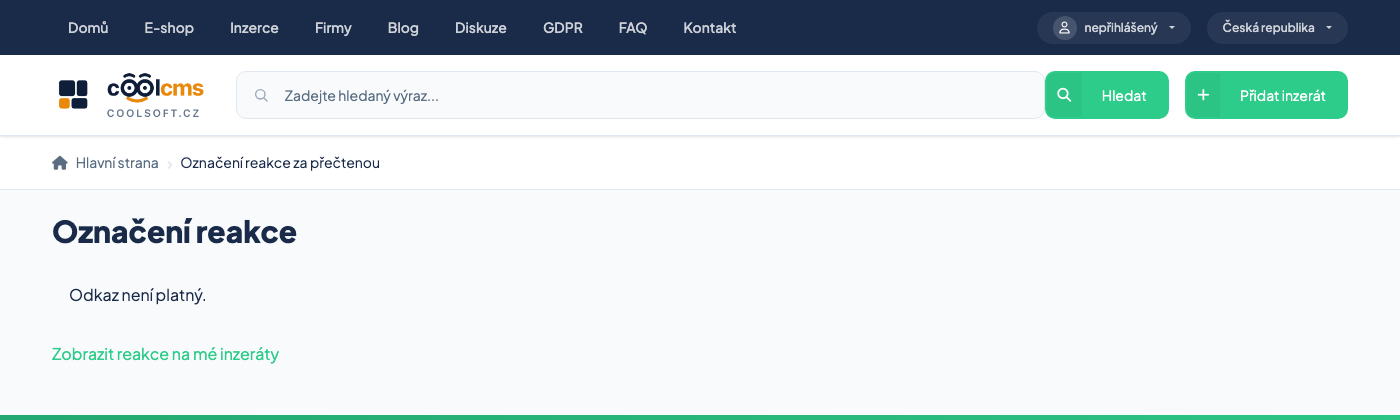
The message "Odkaz není platný" (the link is not valid)
It means the link is damaged, copied only in part, or the reply no longer exists. It applies to signed-out and other users. If you are signed in as the owner of the advert, the reply is addressed to you even without the key, so it is marked for you even if the key in the link is damaged (provided the reply exists). Mark it from the overview on the site. Older replies, which arrived before the button was introduced, have no button in their email at all.
Some mail programs open links by themselves
Security scanners sometimes go through the links in an email before you do. The reply is then marked as read without you seeing it. So check the Reakce na mé inzeráty overview before you consider anything dealt with. If the site recognises that a robot opened the link (a link preview, a search engine), it does not mark the reply and says it can be marked only by opening the link in a browser.
An offered price#
An enquirer can attach their own price to the message. It reaches you as a price offer on their reply.
You need not engage with offers far below your price
Ignoring them is fine. Explaining rarely leads anywhere.
Reply quickly#
The first reply decides more often than the price
An enquirer usually writes to several people and chooses whoever answers first.
What to watch out for#
Offers to send goods by a courier with payment up front are usually a scam
Typically: the buyer offers more than you asked and wants the goods sent through a service of their choosing. The money never arrives.
Never click through to “verify a payment”
A link to a page where you enter card details so that money can reach you is always a scam. Receiving money never requires a card number.
Do not hand over goods before payment
And with a transfer, wait until the money is actually in your account — a payment confirmation that a transfer was sent is not confirmation that the payment was credited.
Handing over in person in a public place is safest
Especially for expensive items.
Reporting#
Adverts and messages usually carry a report link. The operator reviews reports.
Report fraudulent behaviour even if you did not fall for it
You spare somebody else.
When replies do not arrive#
- Check the email on the advert — any typo?
- Look in spam.
- Is the advert visible at all? See Managing adverts.
- Is the price out of line? An advert nobody responds to is usually overpriced.